February 18, 2026
Interactive Work Instructions: A Smarter Alternative to Manuals

.png)

If you manage complex workflows, you know how quickly small instruction gaps turn into delays, rework, and frustrated teams. Paper manuals and static PDFs often slow people down when they should be guiding them forward. That is why many organizations are turning to interactive 3D work instructions to bring clarity and consistency to everyday tasks. We understand the pressure to improve accuracy without disrupting operations.
In this blog, we will explain what 3D instructions are, why traditional manuals fall short, and how digital formats improve task performance and training outcomes. You will also see practical steps for making the shift and what measurable gains to expect.
So, let us start by looking at what 3D interactive instructions actually involve.
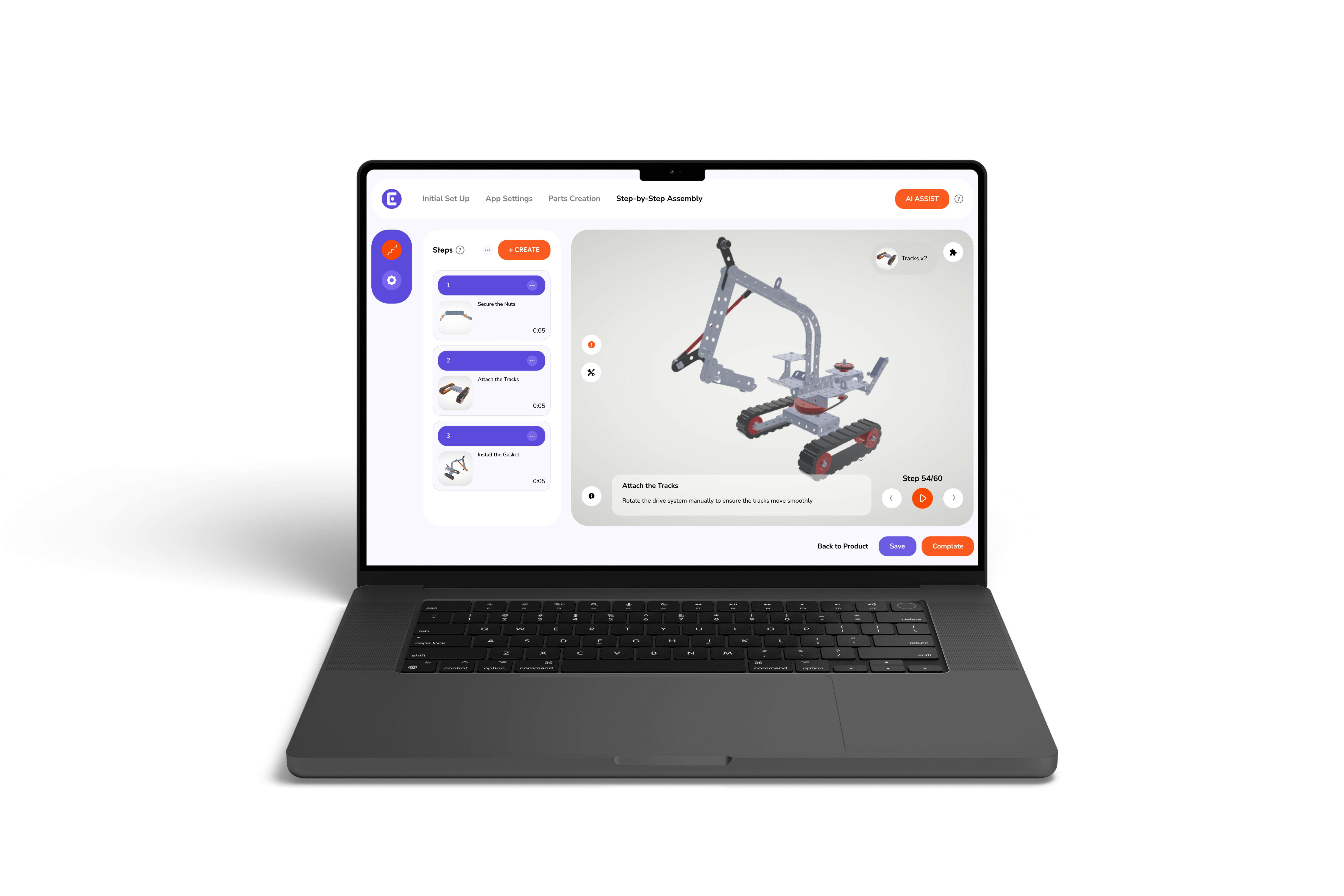
Before we compare formats, it helps to define the term clearly. Many teams hear it often, but few stop to break it down. Interactive work instructions are digital, step-by-step guides that use 3D models, animation, and on-screen prompts to show exactly how a task should be completed.
Unlike paper manuals or static PDFs, these instructions are not fixed images on a page. Workers can rotate models, zoom into parts, follow guided sequences, and receive visual cues in real time. Updates happen instantly across devices, so teams always see the latest version. This approach improves clarity and reduces guesswork, especially in complex assemblies. It also demonstrates how 3D work instructions support workers by making procedures easier to follow and verify.
On the floor, static manuals and PDFs quickly show their limits. They often carry old steps, vague images, and no easy way to find the exact part or to quickly update the content. That mismatch creates real friction for operators who need clear, current directions at the point of work. The result is slower cycle times, more assembly mistakes, and a rise in support calls that pull engineers off higher-value work.
Common failure modes:
These problems compound across shifts and sites, raising labor costs and warranty claims. Moving forward, we will show the core features of interactive 3D instructions that directly address each of these failure modes.
On the shop floor, the right tools save time and prevent errors. Interactive work instructions combine clear visuals with step logic, so workers see exactly what to do and when. Below are the core features that make the difference.
Undeniably, these features cut errors and training time. Now, we’ll look at the measurable gains and ROI you can expect.
Measured, documented gains make testing interactive instructions worth a pilot. The numbers below show clear changes in time, errors, and training effort when teams move from static guides to guided 3D workflows. Review the comparison and short client case to see the practical impact.
Companies that adopt interactive instructions report faster task completion, fewer assembly mistakes, and reduced training hours. Workers follow visual steps instead of interpreting flat diagrams, which lowers support calls and shortens onboarding. These operational improvements convert directly into labor savings and fewer product returns.
A mid-size furniture brand cut wrong-assembly calls by 40% and returns by 28% within three months after switching to Easemble's interactive 3D work instructions. These figures show the benefits of 3D interactive product manual when compared with static guides and PDFs. Now that we have reviewed these results, let’s outline a practical, low-risk path to move from paper manuals to digital work instructions.
If you are asking yourself, “How to make the move to paperless work instructions,” you should know one thing: shifting away from binders and static PDFs does not require a full system overhaul. A careful pilot reduces risk and builds internal support with real data. The goal is to test value quickly, measure results, and then expand with confidence.
Start small and prove value
With pilot metrics in hand, assess platforms for publishing speed, update control, and device support. Those factors should drive your vendor’s decision.
Easemble focuses on turning static manuals into interactive, publish-ready guides quickly. Their toolset targets the common barriers teams face when moving to digital instructions. Below are the core strengths that make adoption practical and measurable.
Easemble offers a web-based creator plus optional 3D modeling services, fast-first-manual publishing, and mobile playback. The platform supports QR and barcode checks, version control, and instant updates, so you avoid version confusion.
Customers report faster onboarding, fewer wrong-part incidents, and lower support demand. The platform functions as a reliable work instruction software that ties visual guidance to checkpoints and audits.
Pricing is pay-per-product, which reduces upfront risk and lets you scale by catalog size. The publishing flow supports a small pilot and then a staged rollout across sites.
To sum up, if you manage assembly, service, or field workflows, you know the cost of unclear instructions. While using paper manuals, small gaps lead to wasted time, repeated work, and frustrated teams. In contrast, interactive 3D guidance brings clarity back into daily operations by showing workers exactly what to do, step by step, with fewer chances for error. The shift to digital work instructions does not require a full system overhaul. It starts with one product, one team, and real data.
So, if you are ready to see the impact in your own environment, contact us to book a demo and evaluate the results firsthand.