January 20, 2026
How to Create Effective 3D Assembly Manuals for Digital and Paperless Workflows

.png)

Learn how to create effective 3D assembly manuals to improve worker training, reduce errors, and streamline digital and paperless workflows.
We've all struggled with confusing assembly manuals and are quite familiar with how time-consuming and frustrating it is. Flat diagrams, tiny text, and vague instructions sometimes make it feel like you need a PhD just to put a chair together. Traditional paper manuals and PDFs often fail to communicate clearly, especially for products with multiple parts or complex assembly steps.
For manufacturers, designers, and assembly teams, these issues can mean rework, delays, and wasted resources. That's why learning how to create effective 3D assembly manuals is so important. These interactive guides provide step-by-step instructions, clear visuals, and 3D models that users can rotate and explore, making even the most complex assemblies simple and easy to follow.
In this blog, we’ll show you how to create effective 3D assembly manuals, explore their benefits, and explain how they can transform assembly processes, reduce errors, and save time for teams and end-users alike.
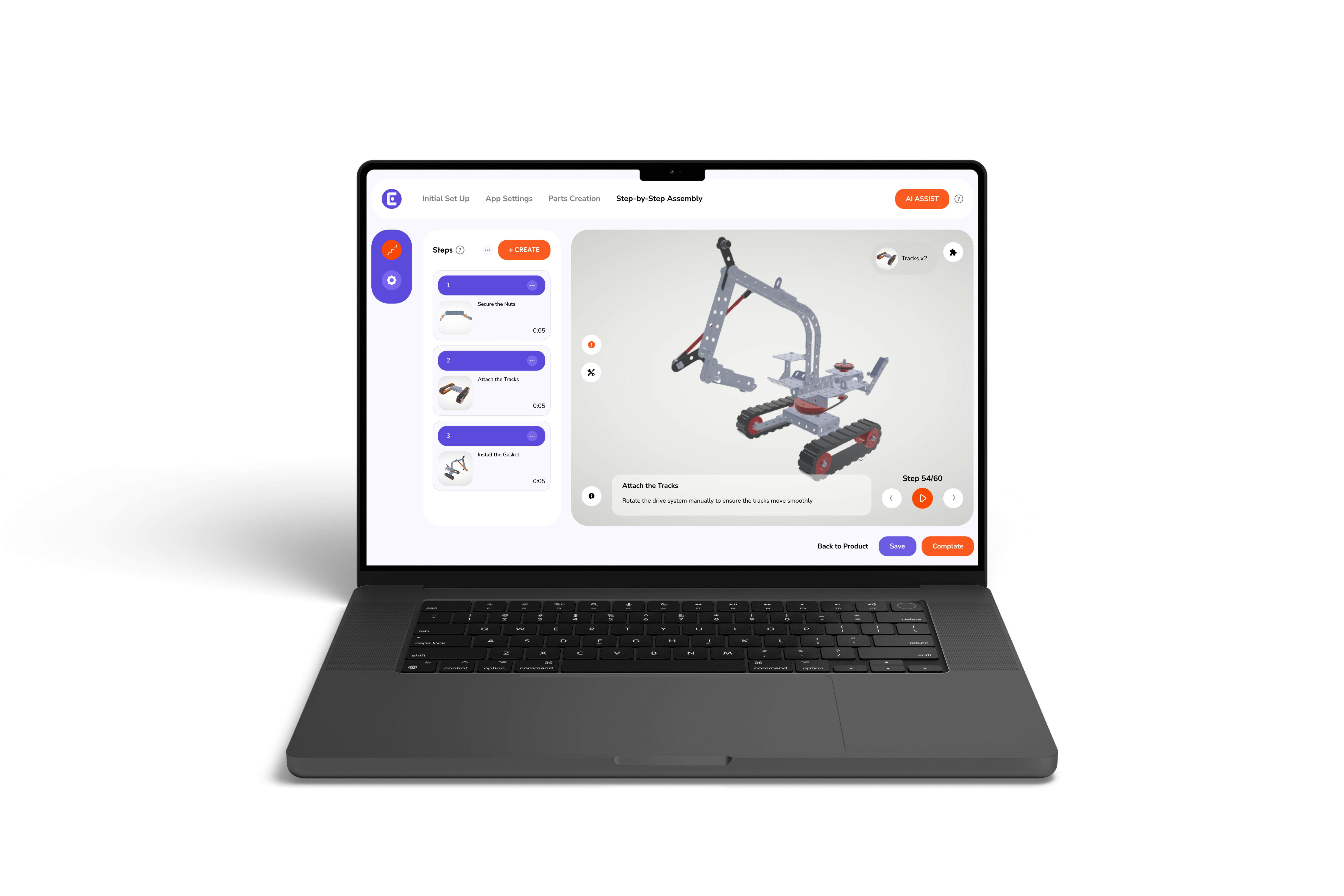
A 3D assembly manual is a digital, interactive guide that walks users through assembling or operating a product. Unlike traditional manuals, these aren't just static images or text; they are dynamic models that you can interact with.
With a 3D manual, users can:
These manuals are often live on web platforms, tablets, or mobile devices and can even be integrated with AR systems to overlay instructions onto real-world products. This interactivity is exactly why businesses are adopting 3D manuals as part of their larger digital work instructions strategy.
Before we explore the power of 3D manuals, let’s admit it; old-school assembly instructions just aren’t good enough anymore. Here's why they are a problem:
Flat, 2D diagrams don't show depth or orientation. Users often have to guess how pieces fit together, leading to mistakes.
Instructions involving multiple parts or detailed sequences can easily confuse even experienced users.
When manuals are unclear, customers call support lines, email service teams, or ask friends for help. This not only frustrates users but also drives up operational costs.
Any product change means printing and distributing new manuals. That's costly, slow, and wasteful.
Traditional manuals don't engage users, leading to mistakes and reduced satisfaction.
Clearly, there's a better way, and that's where 3D interactive manuals shine.
Creating a 3D assembly manual that actually works isn't just about making something look fancy; it's about making assembly simple, clear, and mistake-free. Here's how to do it effectively:
Understand who will use the manual. Are they trained technicians, casual consumers, or first-time users? This helps you decide the level of detail, terminology, and guidance needed.
Use CAD designs or digital prototypes to create precise 3D models. Accurate models prevent confusion and reduce assembly errors.
Divide the assembly process into simple, logical steps. Use numbering, arrows, and color coding to make each step visually easy to follow.
Users should be able to rotate components, zoom in, and explore parts. Animations or exploded views help show how pieces fit together intuitively.
Gather feedback from a small group of target users to identify confusing steps and improve usability before full rollout.
Integrate 3D manuals with digital work instructions to allow for easy updates, remote access, and scalable deployment across teams.
Even after launching, continue collecting feedback, monitoring errors, and updating the manual when processes or products change. Continuous improvement keeps it effective.
By following these steps, businesses can create 3D assembly manuals that make complex assembly tasks faster, safer, and easier for everyone.
So, how 3D interactive instructions simplify product assembly is by turning complexity into clarity. Imagine replacing confusing text and flat diagrams with a realistic, interactive 3D model. So, with this, users can:
These step-by-step 3D workflows reduce mental load, prevent errors, and make the assembly process faster and less stressful. According to a study, it was also found that placing 3D instructions directly on the actual parts helped reduce assembly mistakes by 82%, making the process much easier and more accurate.
The benefits of 3D interactive product manuals go far beyond just looking "cool." They improve usability, efficiency, and bottom-line results:
Users no longer need to guess; everything is visually accurate and easy to follow.
Clear instructions allow users to work independently, reducing calls to support and on-site assistance.
Step-by-step visuals speed up learning for new employees or customers, improving knowledge retention.
Clear visual instructions help users follow procedures correctly, reducing the risk of errors and accidents.
Whether on a desktop, tablet, or phone, users can access the same reliable instructions anywhere.
Digital manuals are reusable, scalable, and easy to update, reducing printing, training, and support expenses over time.
Digital work instructions are the backbone of modern assembly and training. Instead of relying on old paper manuals, they offer interactive, cloud-based content that’s easy to access. Some of the biggest benefits include:
By combining 3D assembly manuals with digital instructions, users always get the most accurate, up-to-date guidance, making assembly faster and less stressful.
Curious about how to make the move to paperless work instructions? Here's a roadmap:
Paperless instructions are eco-friendly, cost-efficient, and scalable, perfect for modern businesses looking to stay ahead.
Tip: Always start with a pilot project before going fully paperless. This allows you to test interactivity and gather user feedback.
Consider switching when:
Adopting 3D manuals at the right time ensures smoother operations and happier users.
Creating effective 3D assembly manuals is no longer just a "nice-to-have"; it's essential. These manuals improve accuracy, reduce support costs, and enhance user experience while supporting a shift toward digital work instructions and paperless operations. Ready to transform your assembly process?
Easemble makes it easy for organizations to create and implement 3D interactive instructions tailored to their products. From simplifying complex assemblies to boosting efficiency, our digital assembly solutions help your teams work smarter, not harder.