April 13, 2026
Augmented Reality in Instruction Manuals: A Complete Guide
.png)

Anyone who has stared at a half-built product and a confusing manual knows the feeling. One page says, “attach the bracket,” another shows a tiny sketch that may or may not be the right part, and suddenly, a simple setup eats half the afternoon.
That is exactly where augmented reality instruction manuals come in. They replace guesswork with visual steps that are easier to follow, especially for products that need careful assembly or setup. In this guide, we will look at how they work, why they matter, and how brands use them to make support easier for everyone.
At a basic level, AR instruction manuals turn simple steps into a visual guide layered onto the real product. Instead of guessing, users see what to do next in context, whether it is a 3D part, a highlighted position, or a clear next move.
This shifts things from traditional paper guides, which often force people to interpret flat diagrams. That sounds easy until parts look similar or angles are unclear. Digital instruction manuals reduce that confusion.
People also learn faster by seeing actions, not just reading them. That is why interactive AR ins manuals are gaining ground across products that need a clear setup. They do not replace logic; they simply make it easier to follow.
Most teams do not start with bad intent. They start with a manual that was “good enough” at one point, then the product grows more complex, the support tickets rise, and the old instructions begin to show their limits.
Here is where the pain usually shows up:
That last part is easy to miss. People do not only remember the product. They remember the struggle around it.
Comparisons between 2D and 3D manuals show a clear gap. Flat illustrations can be hard to follow, especially for complex assemblies, while 3D instructions let users rotate, zoom, and view the build from different angles.
The difference is not just visual; it comes down to clarity.
This is where the idea gets practical. Augmented reality guides are not just a nice visual layer. They solve problems that show up after the product ships, when the customer is alone with a box and a deadline.
In fact, an AR‑based assembly support experiment showed AR instructions reduced error rates by about 82% in complex assembly tasks versus conventional monitor‑based or paper instructions. A good manual does not just teach. It calms the user down.
This is where the benefits of the 3D interactive product manual become clear. Users spend less time flipping pages, support teams handle fewer repeated questions, and product teams fix less confusion after launch. The experience feels more direct.
When a guide shows the action clearly, the brain does less translating. That is how 3D assembly instructions enhance training and reduce errors. Fewer mental jumps usually mean fewer mistakes.
Tech products make this issue even more visible. A furniture screw is one thing. A smart device, sensor, appliance, or connected product is another. The steps may be small, but the consequences of a wrong step can be annoying, expensive, or both.
That is why tech products need better installation instructions, which is not a side issue. It sits right at the center of customer experience.
A better setup guide can help when:
This is where AR-based product documentation stands out. It guides users through setup in a way that feels more like following along than reading. Not every product needs it, but when setups get complex, plain text often falls short.
That is also where digital work instructions come in. They help teams stay consistent across training and service, while making updates easier without reprinting manuals.
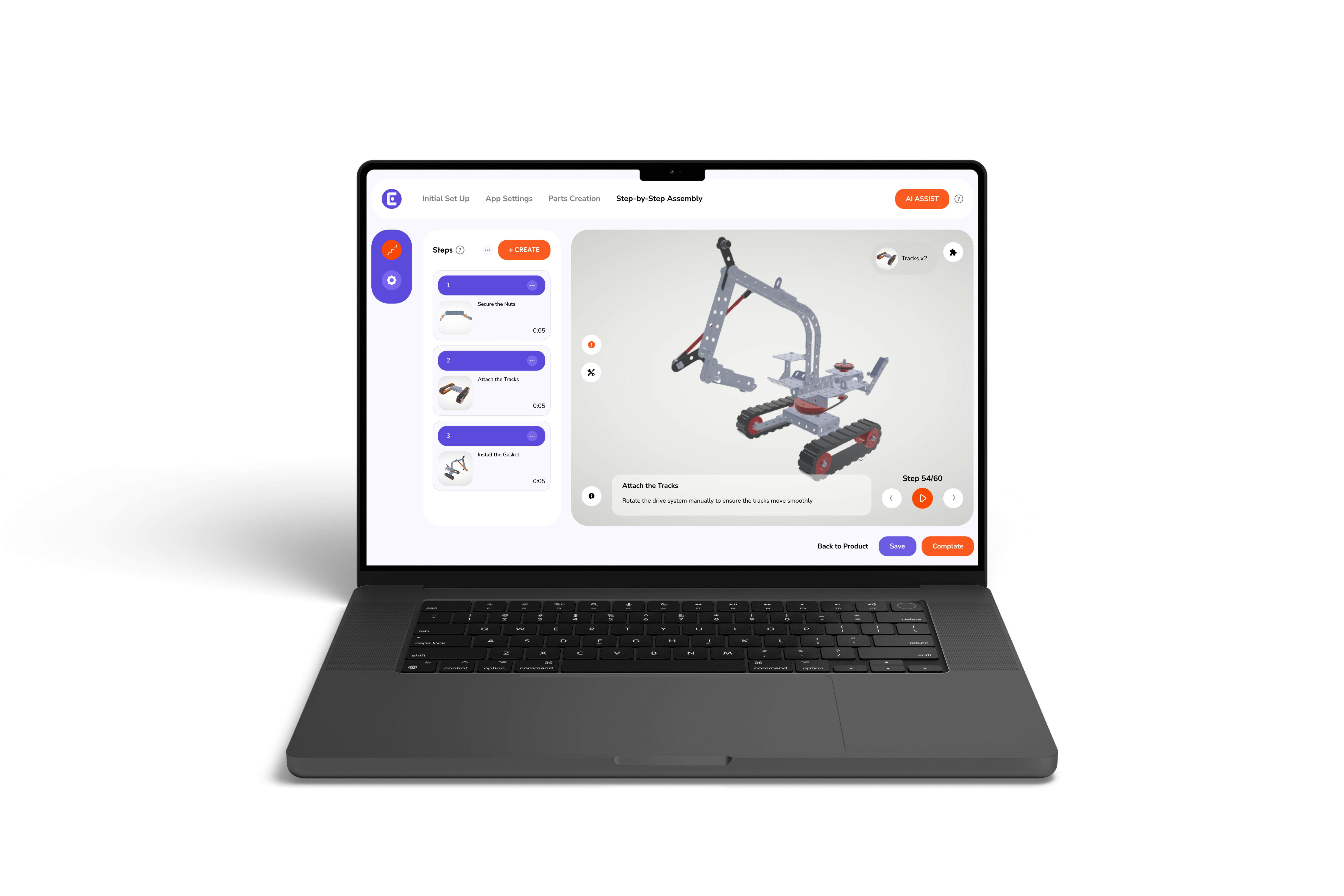
Easemble turns static manuals into 3D guided experiences built for real use. It helps ready-to-assemble brands move from outdated instructions to mobile-friendly 3D manuals that improve clarity and reduce support friction.
The setup stays simple. Teams can add a product, upload a 3D model, and build and share manuals without getting stuck in complex tools. That ease matters more than it sounds.
The AR layer places instructions directly into the real environment, so users can follow steps where the work is happening. It keeps guidance accurate and easier to trust. For teams that still need print, PDF manuals remain an option, with QR codes linking back to the 3D version.
In short, it supports both digital and print, without forcing a single format.
The phrase, “The Future of 3D Assembly Instructions,” sounds a little big at first, but the direction is already clear. Users want fewer steps that feel unclear. Brands want fewer support calls. Technical teams want documentation that stays accurate without constant rework.
That future is not about adding flashy features for show. It is about making instructions feel more direct, more visual, and less tiring to follow. In practice, that means smaller moments of clarity inside the setup process, the kind that keep people moving instead of stopping to guess.
A lot of teams are already moving this way because the old format has limits. A manual can be written well and still be hard to use. That gap is where AR, 3D guides, and cleaner digital workflows keep proving their worth.
Augmented reality instruction manuals are not just a shift in format; they reflect a shift in how people prefer to learn and interact with products. When instructions feel clearer and more visual, the whole experience changes. Setup becomes less about trial and error and more about steady progress.
For product teams, that often means fewer mistakes, fewer repeated questions, and a smoother journey after the sale. For users, it simply feels easier, and that first interaction tends to shape how they see the product as a whole.
There is still room for simple manuals where they make sense. But as products become more detailed, the need for clearer, more guided instructions keeps growing. And that is where this approach quietly proves its value.
AR manuals overlay 3D visual steps onto physical products via mobile devices, replacing static paper guides with real-time, contextual instructions.
They eliminate 2D diagram confusion by showing exact part placement in 3D, which can reduce assembly errors by up to 82%.
Interactive 3D models allow users to rotate and zoom, revealing hidden angles that flat, static paper illustrations often fail to show.
By providing clearer initial guidance, AR reduces setup frustration and significantly lowers the volume of basic troubleshooting tickets and calls.