January 23, 2026
How 3D Assembly Instructions Enhance Training and Reduce Errors

.png)

Discover how 3D assembly instructions enhance worker training, reduce errors, improve accuracy, and streamline workflows for better productivity.
If you run a shop floor, you know how costly a misread diagram can be. A single unclear step can mean rework, scrap, or a stalled line. This blog post answers the question, “How 3D assembly instructions enhance training and reduce errors,” by explaining what 3D guides show that paper and PDFs cannot, and how that clarity shortens training and cuts mistakes. You’ll see concrete examples of features that matter, a compact comparison table, and a step-by-step pilot plan you can try on one line.
Read on to see which processes benefit most and how to get started without disrupting output. But first, let’s look at why traditional manuals keep causing the same problems.
As time proceeds, the age-old paper manuals and instruction booklets continue to become more and more obsolete. Let’s have a look at why that is happening and how traditional paper manuals are causing training gaps.
Most printed manuals list steps and show flat diagrams. That forces new hires to imagine motion and fit before they act, which takes time and increases variance. Trainers fill those gaps by watching and correcting, which extends the hours needed to become competent. With high turnover or seasonal hires, these lost hours add up quickly and reduce overall throughput.
Printed copies and shared PDFs multiply versions across shifts and sites. When a process changes, workers still use the old page unless someone physically replaces it. That mismatch causes compliance issues and visible quality problems. Central control of instructions is hard when paper is in play.
Two-dimensional drawings struggle to show orientation, sequential movement, or hidden features. Learners forget or misapply steps because their mental image differs from reality. In practice, that leads to rework and extra inspection.
Managing printed updates, shipping manuals, and auditing versions consumes time and budget. Scaling a paper-based approach across sites multiplies those costs. These gaps create a clear need for better formats, which is where digital work instructions begin to help. Next, we’ll define what interactive 3D work instructions actually are and how they address each problem.
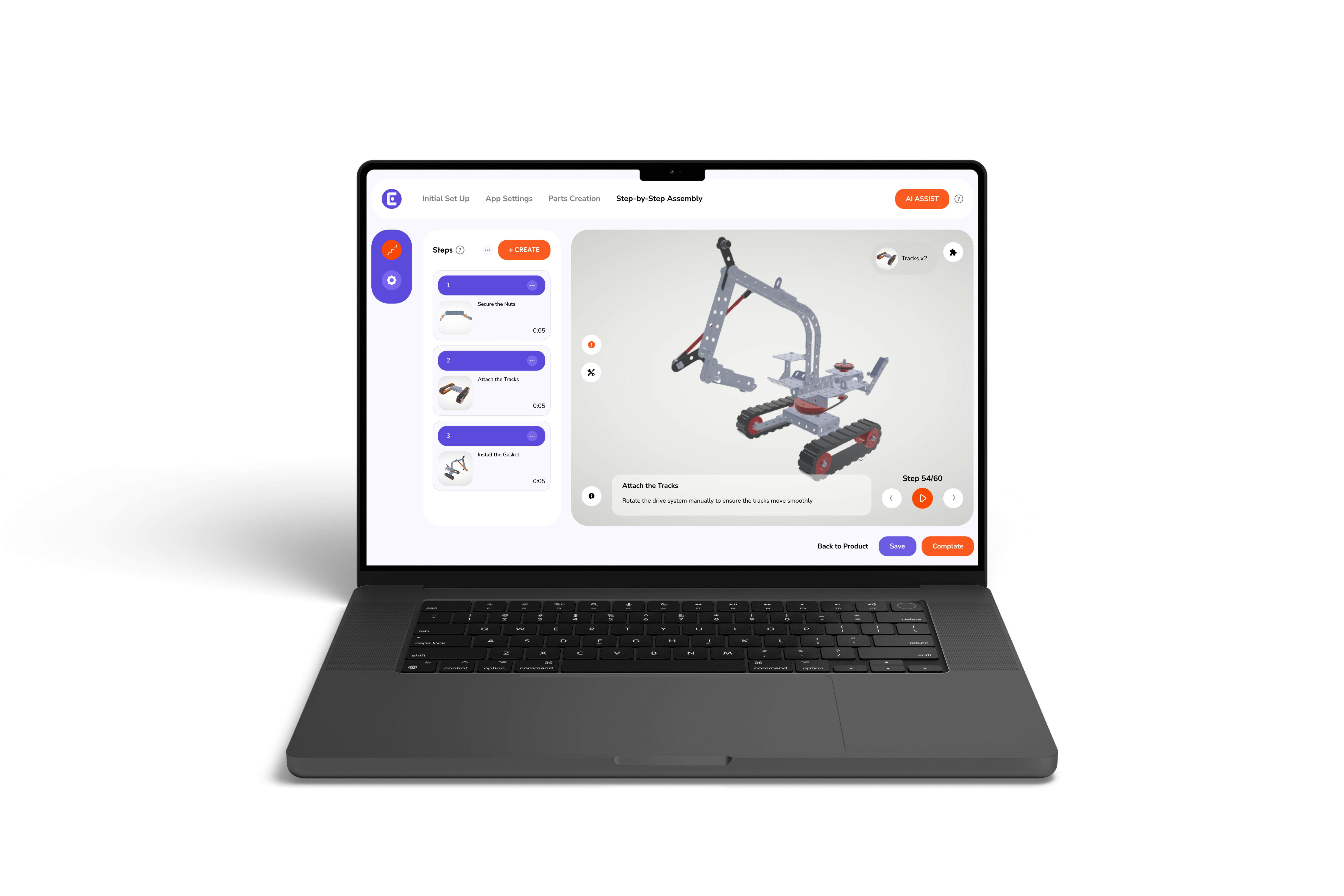
3D assembly manuals use digital models and short animations to show how parts move and connect. Users can rotate, zoom, play an animated step, and confirm completion. That direct view removes much of the guesswork that text and static images require.
Expect three core features: the ability to view parts from any angle, short animated sequences that show motion and orientation, and step validation that requires confirmation before moving on. These combine to create a guided workflow rather than a passive page.
When a worker can replay a motion and then perform it, learning is faster and more reliable. Operators stop guessing and start following validated sequences. Undeniably, this reduces calls for help and shortens the time a trainer must watch an operator.
With those features in mind, let’s consider why now is a good moment to adopt 3D guides.
Shifts in staffing, product variety, and quality expectations make clear instructions more urgent. As product families grow and factories run multiple variants, mistakes cost more. A low-risk pilot shows quick wins and protects production while you collect data. If you want a starting point, look into how to make the move to paperless work instructions and pick a low-complexity, high-error process for your pilot. This keeps risk small and learning focused.
The next section breaks down the measurable benefits you can expect and shows a quick comparison table.
Briefly explained below are a range of perks that come along with digital 3D manuals:
When steps show motion and fit, operators work with fewer stops and fewer clarifying questions. That reduces cycle time and error checks. Teams often report shorter task times simply because workers don’t need to pause and interpret static diagrams.
Visual steps support quicker learning. A short animation clarifies orientation and movement in seconds, where text could take minutes to explain. Adding the 3D animations feature makes complex moves obvious and easier to rehearse before doing the real task.
Digital assembly instructions let you push updates instantly, which ends version drift. The single-source model creates an audit trail for changes and ensures everyone follows the same steps.
Step validation and clear acceptance criteria reduce the need for rework and inspection. That improves throughput and frees supervisors for higher-value tasks.
Till now, we have been talking in words, but to explain more effectively, let’s talk in numbers:
These figures reflect common outcomes teams report when moving from paper to pixels. The combination of lower error rates and faster training often covers the initial effort to create 3D guides within months.
Now, let’s walk through a practical step-by-step path to implement without causing downtime.
Start with an audit: identify steps that generate the most defects or take the longest to teach. Choose a single line or product for a pilot. Build the 3D steps for the highest-risk tasks first and test them with the operators who do the work.
For authoring, control, and peace of mind, evaluate Easemble, a 3D work instructions software that ties models and manuals to authoring and editing as per your device.
If you want a concise answer to how 3D assembly instructions enhance training and reduce errors, it is this: clear motion, interactive steps, and fast updates make work easier to learn and harder to misread.
Start with a focused pilot, measure error and training time, and expand where the numbers show value. To try a low-friction pilot or see a live demo, contact Easemble as your digital assembly solutions provider and ask for a titled pilot on one line.