July 21, 2026
Why Manufacturers Are Replacing PDF Manuals with 3D Instructions

.png)

Static PDF manuals are falling short for complex products. Interactive 3D instructions solve this by letting users rotate, zoom, and visualize steps clearly, reducing assembly errors, training time, and support overhead.
You know that moment when you open a new bookshelf box, dump every screw onto the floor, and unfold a manual with sixteen tiny black and white diagrams that all somehow look identical? That's not a manufacturing problem. That's a communication problem. And it's one that's finally getting fixed.
For decades, PDF manuals were just... how things worked. You bought a product; it came with a paper booklet or a downloadable file, and you squinted at flat drawings while trying to figure out which "Part B" they meant. Nobody loved this system. Manufacturers tolerated it because there wasn't really a better option. Now there is, and that changes the whole conversation around 3D instruction manuals.
Here's the thing about PDF manuals: they were designed for a world where products were simpler, and updates were rare. Neither of those is true anymore.
A flat diagram can only show one angle at a time. If a part needs to rotate 45 degrees before it clicks into place, a static image just can't communicate that. Readers are left guessing, and guessing is where mistakes start.
There's also the update problem. Say a manufacturer tweaks a bracket design halfway through a production run. With a PDF, that means editing a file, re-exporting it, redistributing it, and hoping every retailer and warehouse swaps out the old version. In practice, outdated manuals circulate for months, sometimes years.
A few other pain points come up again and again when manufacturers talk about their old PDF manuals:
None of this makes manufacturers look bad on purpose. It's just what happens when your documentation format hasn't evolved, even though your products have.
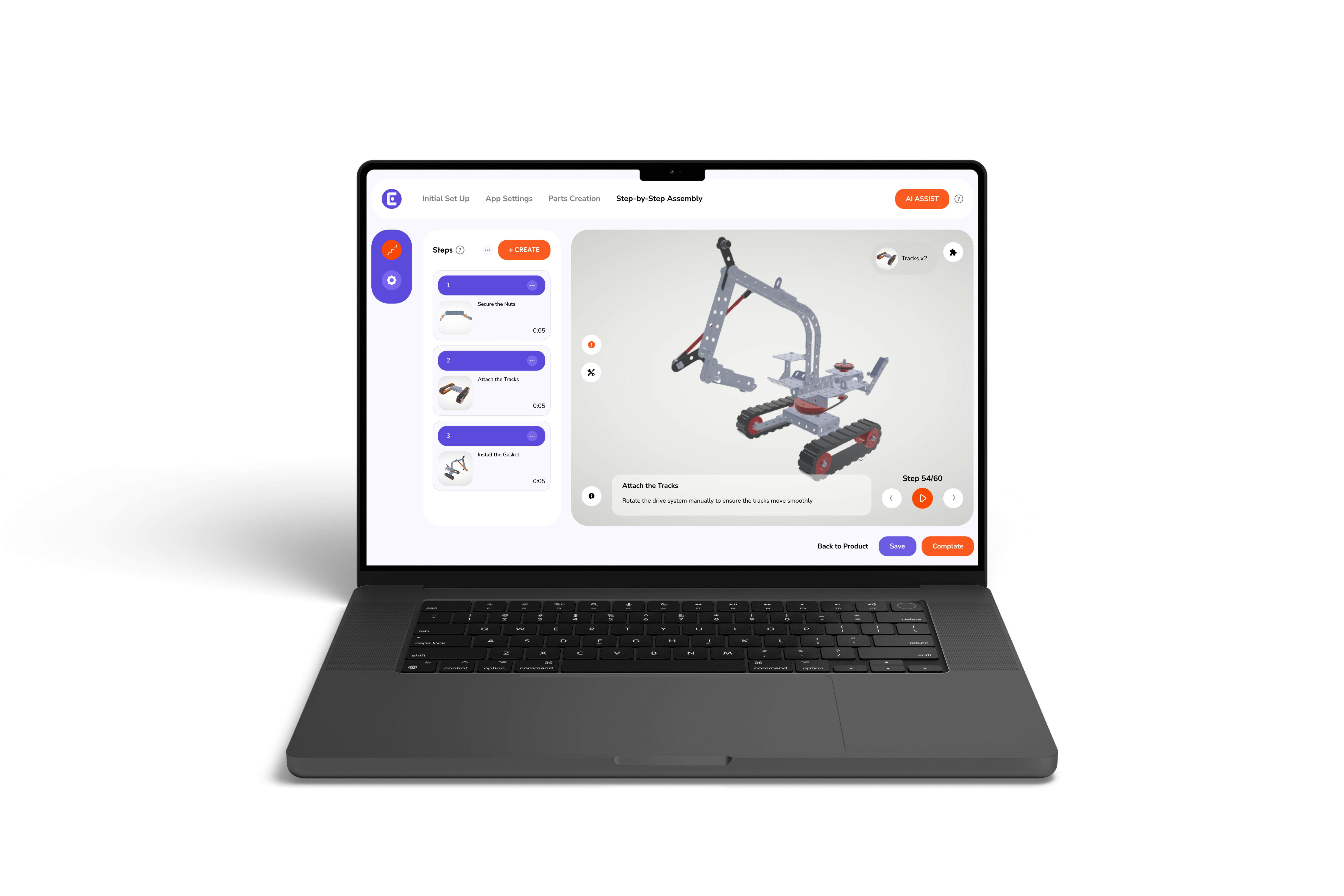
So, what's the alternative? Interactive 3D instructions let customers rotate a model, zoom into a specific joint, and watch a part slide into place step by step, right on their phone or laptop. Instead of interpreting a flat drawing, they're watching something closer to a real demonstration.
This isn't about making things flashy for the sake of it. It's about matching the format to how people actually think. Most of us understand a physical object better by turning it in our hands than by reading a description of it. Digital assembly manuals just bring that same instinct online.
The shift usually starts small. A manufacturer digitizes one product line, watches support tickets drop, and then rolls the format out further. It tends to build momentum on its own once teams see the difference in practice.
This is where the format earns its keep beyond the sales pitch. When manufacturers talk about how 3D assembly instructions enhance training and reduce errors, they're usually describing the same thing: new hires who used to need weeks of shadowing now get there in days, because they're watching the actual motion instead of guessing at a flat drawing.
With interactive guides, new team members can move through each step at their own pace, replay a tricky section, and see exactly how a part should sit before moving forward. That alone cuts down on the kind of small errors that come from misreading a flat diagram or skipping a step by accident.
A quick comparison makes the difference easy to see:
Manufacturers working with remote teams or multiple installation sites tend to notice this fastest. When everyone is learning from the same interactive source, training becomes less about individual trainers and more about a consistent standard.
Not every product needs this level of detail. A simple item with three parts is probably fine with a basic diagram. But once you're dealing with wiring, calibration steps, or multi-stage builds, a flat manual starts to work against you.
Consumer electronics, industrial equipment, and modular construction pieces all share the same challenge. There are steps that depend on other steps. Get one wrong, and the whole sequence falls apart.
It's a big part of why tech products need better installation instructions than a static booklet can realistically provide, since a missed step in a wiring sequence isn't just confusing; it can be a safety issue.
Some of the biggest gaps show up in these areas:
It's easy to think of this as a support tool, something that only matters after the sale. But when you actually map out the benefits of 3D interactive product manual adoption, the impact shows up earlier than that, all the way back at the point of purchase.
A lot of shoppers now check how difficult a product is to assemble before they commit to buying it. In fact, only 25% of the time people read the manuals; the rest of the 75% of users don't read traditional product manuals, making interactive, visual documentation far more effective for onboarding customers.
If a manufacturer embeds an interactive manual right on the product page, that hesitation tends to shrink. People can see for themselves that the build isn't going to be a headache.
Here's a broader look at where the benefits show up:
That last point matters more than people expect. A customer who assembles something without frustration is simply more likely to leave a good review, or recommend the product to someone else. Digital work instructions end up doing double duty, supporting the customer while quietly supporting the brand too.
It's worth being honest here. Nobody has a complete picture of the future of 3D assembly instructions yet, and anyone who claims otherwise is guessing. But a few directions are already visible.
AI-assisted manual creation is making it faster to turn an existing 3D model into a finished, step-by-step guide, cutting a process that used to take weeks down to something closer to an afternoon.
Manuals are also starting to live earlier in the customer journey, embedded on product pages instead of tucked away in a support section. And analytics are starting to show manufacturers exactly where customers pause or get stuck, which is information PDFs never could have offered.
None of this means paper manuals disappear overnight. Some products, some regions, and some customers will still want a printable option, and that's fine. The point isn't to eliminate every format. It's to stop treating a flat PDF as the only option when something more useful now exists.
To fix the disconnect between modern products and outdated instructions, Easemble provides a purpose-built solution for manufacturers. The platform empowers teams to take existing 3D assets, such as FBX, GLB, or OBJ files, and turn them directly into intuitive, interactive manuals, completely eliminating complex development work and costly turnaround times.
We publish that manual everywhere at once: web, mobile, printable PDF, and even video, all from a single source. When something changes on the product side, we update it once, and it goes live across every format instantly. No reprints, no mismatched versions floating around.
At the end of the day, static PDF manuals served their purpose, but modern products and modern customer expectations have simply outgrown them. Holding onto flat diagrams in an interactive world only invites avoidable support tickets, higher training costs, and setup frustration.
Moving to 3D instructions isn’t about chasing a tech trend; it’s about making complex builds intuitive, updates effortless, and the entire post-purchase experience smoother for everyone involved. As products continue to evolve, how we explain them should, too.
3D instructions eliminate assembly confusion by letting users rotate parts, zoom in, and see exact real-time depth and orientation.
Interactive 3D guides allow workers and customers to visualize complex spatial movements, drastically shortening learning curves and assembly mistakes.
Complex products requiring multi-angle wiring, precise calibration, or strict step-by-step assembly benefit most from interactive 3D instruction manuals.
Single-source 3D manuals instantly update across all platforms, eliminating reprint expenses, translation bloat, and routine customer support calls.
Yes, previewing interactive 3D assembly on product pages builds buyer confidence, reduces setup frustration, and drives better customer reviews.