September 17, 2026
Modernize Your Documentation With Interactive 3D Models
.png)

Interactive 3D models let customers rotate, zoom, and explore products through guided steps. Manufacturers already build these models for marketing and configuration. Repurposing those assets for documentation can help customers assemble products and resolve setup issues after checkout.
Many manufacturers invest in detailed 3D models for their products. That model might power a product-page visual or even drive an online configurator. Then the sale closes, and that same model gets shelved while a black-and-white paper diagram takes over the job of teaching someone how to assemble the product.
This leaves manufacturers with an opportunity to get more value from an asset they've already created. The same 3D model created to showcase a product can also support assembly, installation, and usage instructions, provided it contains the necessary detail.
This guide breaks down what interactive 3D models change in modern product documentation and where this category is heading as manufacturers stop treating 3D assets as single-purpose spend.
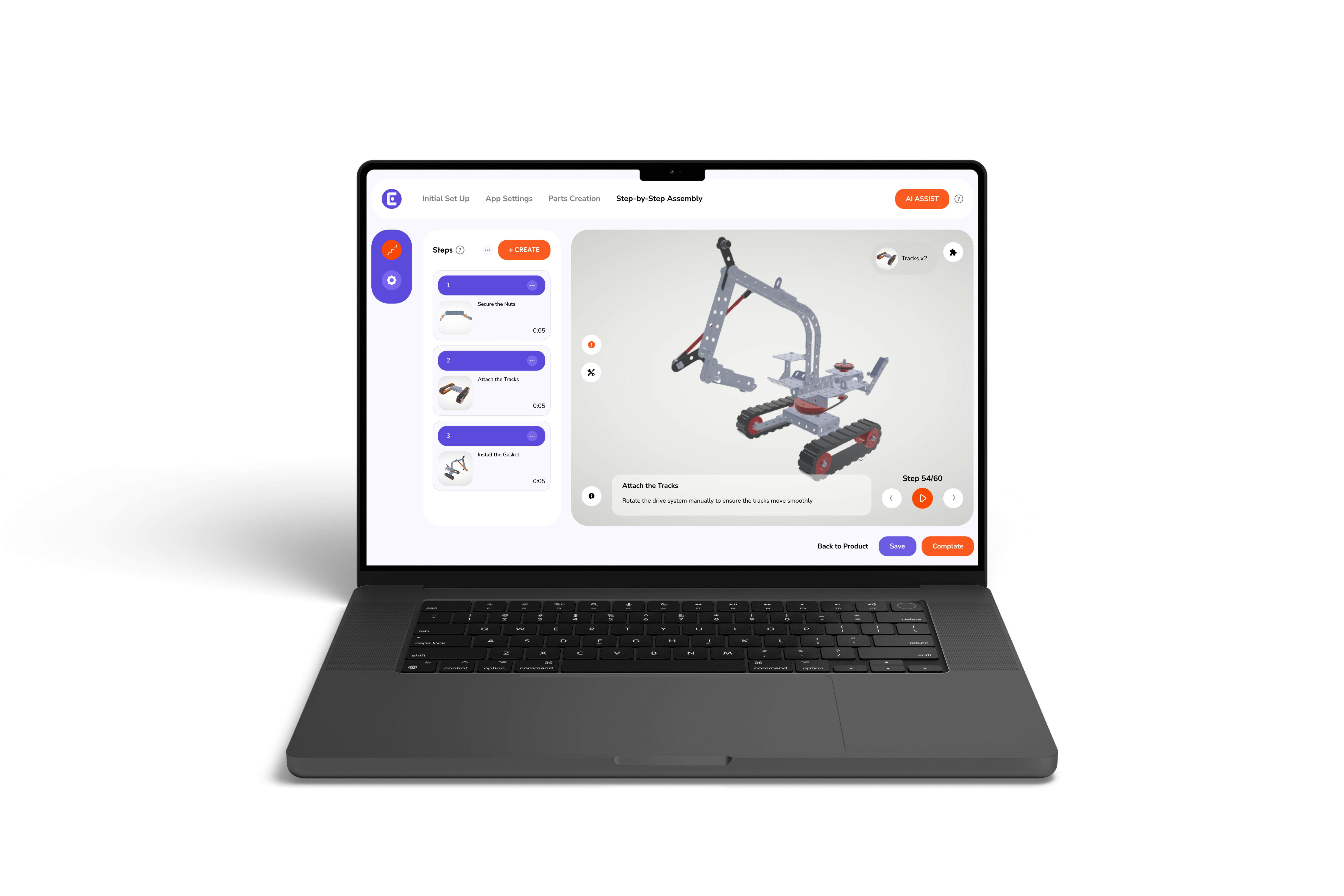
An interactive model for modern product documentation is a product asset that a customer can rotate, zoom, and step through in sequence. Unlike a static exploded-view drawing, an interactive model can guide customers through individual assembly steps, with views tailored to each task.
The distinction becomes clearer when customers use each format to complete the same task. A printed diagram requires readers to interpret a 2D drawing in three dimensions and remember how each step connects to the next.
Interactive 3D documentation reduces that required mental effort considerably. Customers can inspect a component, view its position in the assembly, and advance through the instructions at their own pace.
Even a well-written manual can be difficult to follow when static diagrams cannot clearly communicate spatial relationships or assembly sequences.
A printed diagram can't show depth or sequence clearly, no matter how carefully it's drawn. Printed instructions can also become outdated when a product revision changes components or assembly steps, leaving customers with guidance that no longer matches their model. Add multiple languages into the mix, and a manufacturer is now managing a separate print file for every market, each one needing its own update cycle when any modifications are made.
Interactive 3D documentation offers a more efficient way to communicate complex assembly steps, particularly when spatial relationships are difficult to show in print.
The advantages of 3D instructions can help customers and technicians understand assembly steps and learn unfamiliar products.
Assembly confusion mostly arises when customers struggle to match a diagram to the components in front of them. A static diagram may leave customers to interpret how the illustrated parts relate to the physical product. An interactive model can let customers inspect a component and view its position from an angle suited to the current assembly step.
A printed manual is frozen the moment it goes to print. If a product gets even a small revision, every unit already in a customer's hands is now paired with instructions that don't match. Digital documentation can be updated centrally, allowing manufacturers to publish revised instructions without waiting for another print run.
A single interactive model translates on demand instead of requiring a separate print file, a separate proofread, and a separate update cycle for every market a product ships to. One source file does the work that used to take a stack of regional versions.
The same interactive instructions used for customer assembly can also help technicians learn installation and service procedures. Shared digital instructions give technicians a consistent reference, reducing reliance on informal knowledge transfer.
Put together, these applications give customers and technicians a more visual way to follow product instructions. The savings in support time, returns, and training hours compound the longer a product stays on the market.
A survey found that 65% of respondents who returned non-defective electronics made that decision during unboxing, installation, or first use. These early interactions represent an opportunity for clearer and more accessible interactive 3D documentation.
Interactive models can standardize product training for technicians, installers, and new hires. They can ultimately help organizations maintain consistent internal guidance.
Printed technical manuals can be interpreted differently depending on a technician's experience and familiarity with the product. Digital work instructions built from the same interactive 3D model give every technician the identical step-by-step guidance, whether they're onboarding in week one or troubleshooting a product they haven't touched in months. That consistency is invaluable in industries where a missed step could pose a safety issue or a warranty claim.
Consumer electronics manufacturers face additional documentation challenges during product setup and configuration. Setting up an electronic device may involve pairing, firmware updates, and configuration steps that are difficult to explain in a compact quick-start guide.
Interactive assembly manuals for consumer electronics manufacturers can provide clearer visual guidance for device setup and assembly. An interactive guide can walk customers through relevant pairing and setup steps, giving them a more detailed reference than a compact printed card.
One emerging opportunity for manufacturers is to reuse 3D assets across more stages of the product lifecycle. Interactive product guides can connect configuration, assembly, training, and ongoing support through a shared visual asset.
As manufacturers expand this approach, keeping documentation aligned with product revisions also becomes important. A redesigned component or updated assembly sequence can make an existing guide inaccurate. Version control helps teams track model changes and identify which instructions need revision, particularly when managing multiple product variants.
Digital documentation gives manufacturers a way to revise and republish instructions without waiting for a new print run. However, the process still depends on maintaining accurate models and approved instructions for each product version.
The future of product documentation may involve 3D assets that support customers from initial configuration through assembly and ongoing product use. As for the manufacturers, the opportunity lies in building documentation workflows that keep pace with the products they support.
Modern product documentation can do more than explain assembly steps. Manufacturers can extend the value of existing 3D assets by using them in post-purchase documentation. Interactive 3D models can support assembly, onboarding, and troubleshooting without requiring manufacturers to create every visual asset from scratch.
Manufacturers can explore how Easemble converts existing 3D assets into interactive assembly experiences for customers and internal teams.
They replace static diagrams with a product view customers can rotate, zoom, and step through, showing exactly how a product goes together instead of requiring the reader to interpret a flat drawing.
Yes. Most manufacturers already have detailed 3D models from marketing or configuration work. Those same files, typically in FBX, GLB, or OBJ format, can be converted into interactive assembly guidance without remodeling.
By closing the gap between expectation and reality during assembly. Visual guidance research has linked real-time product visualization to a 15 to 40 percent reduction in returns, largely from fewer assembly errors and less confusion.
Yes. Most modern platforms support web-based viewing on mobile and tablet alongside a dedicated app, so customers can access instructions through a browser, QR code, or embedded widget without downloading anything extra.
Electronics setup often involves pairing, firmware updates, and multi-step sequences that static quick-start guides struggle to communicate. Interactive 3D guidance reduces the point in setup where customers typically get stuck.