August 17, 2026
The Advantages of 3D Instructions Guide: Why Interactive 3D Manuals Are Replacing PDFs
.png)

Assembly instructions should make a task easier, not force users to figure out what a drawing means.
Yet many products still depend on text-heavy manuals, static diagrams, and PDFs. These formats can become difficult to follow when parts look similar, orientations matter, or several components must connect in a specific sequence.
That is where 3D instructions offer a different approach. Instead of relying only on flat images, they can show product geometry through interactive models that users can rotate, zoom, and explore.
The value goes beyond appearance. Well-designed 3D guidance can make spatial relationships easier to understand, support training, and reduce ambiguity during complex tasks.
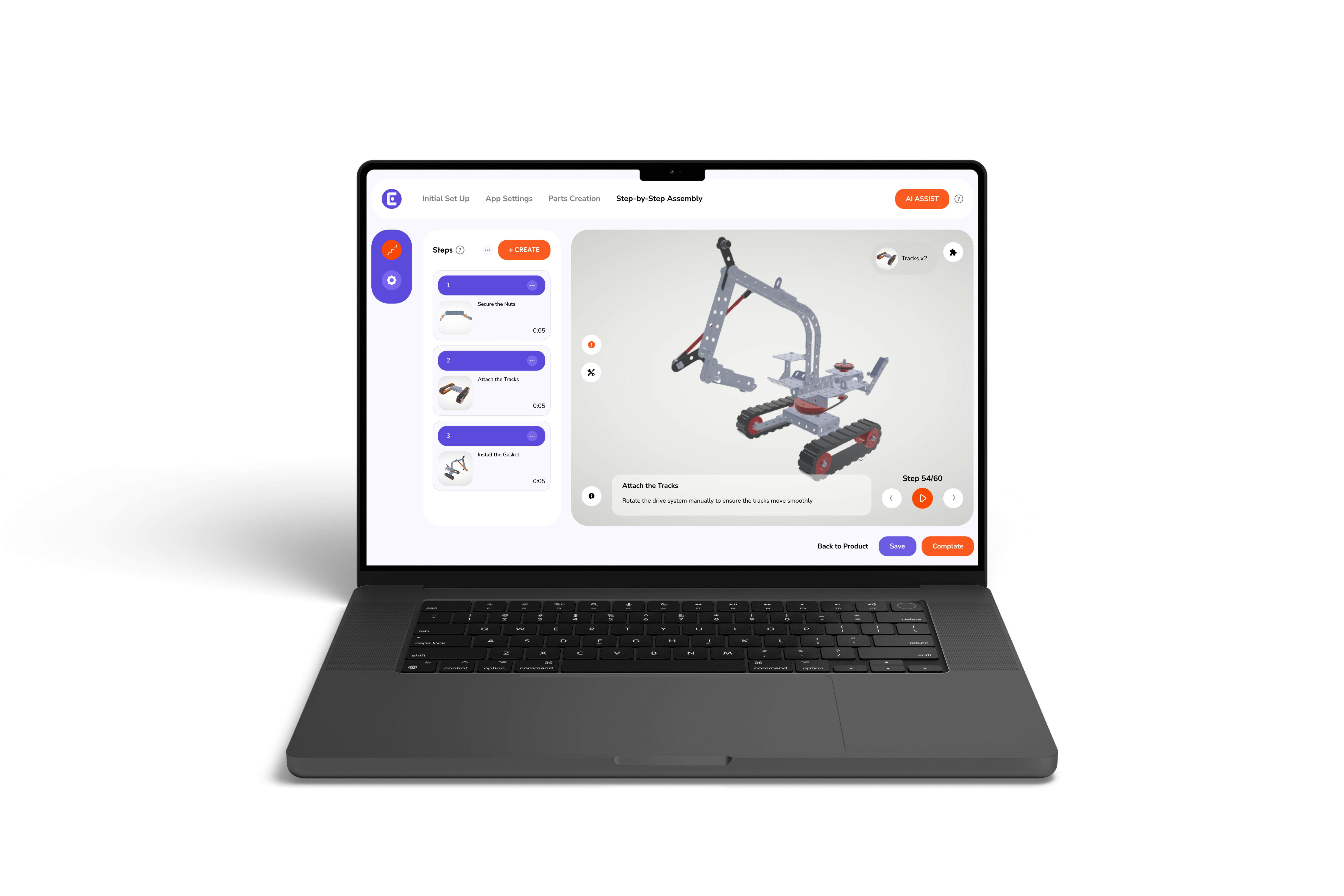
3D instructions are digital guides that use three-dimensional models to show users how parts fit together and how to complete each assembly step. Users can rotate, zoom, inspect, and follow components through a sequence instead of relying only on static diagrams.
This makes 3D guidance particularly useful when assembly depends on part orientation, movement, or complex spatial relationships.
3D instructions are interactive digital guides that explain assembly, installation, or maintenance using three-dimensional product models.
Unlike a printed manual, an interactive guide can let users view a component from different angles. They can also zoom into a connection, isolate a part, or revisit a previous step.
Many 3D instruction manuals can be developed from an existing 3D product model. This allows teams to build step-by-step guidance around the product's actual geometry.
Depending on the platform, a guide can include:
The result is an instruction experience that shows not only what to do, but also where and how a component fits.
Traditional manuals mainly communicate through text and static illustrations. Users must interpret those visuals and translate them into physical actions.
3D guidance adds another layer of information. Users can interact with the model and examine relationships between components before performing the step.
That distinction becomes more valuable as products become more complex.
Poor assembly instructions can cause confusion, mistakes, rework, and unnecessary support requests.
Dense text, unclear diagrams, and poor orientation can make even simple steps difficult to follow. Users may understand the parts but struggle to see how they fit together.
Clearer digital assembly instructions provide guidance when and where users need it, creating a smoother assembly experience and greater confidence.
One major advantage of 3D assembly manuals is their ability to show product geometry from multiple angles.
A flat image may show where a component belongs. A 3D model also shows its orientation, surrounding parts, and movement.
Users can rotate and zoom into a connection to understand how components fit together. This is especially useful when parts look similar or require a specific orientation.
Complex assemblies often require users to understand several relationships at once.
Interactive 3D instructions can break these relationships into focused steps. Parts can be highlighted, separated, or animated so users can concentrate on the action they need to complete.
A 2025 peer-reviewed study on a “lightweight 3D interactive assembly guidance method” found that the approach was designed to reduce assembly errors and task time while reusing existing process-design and simulation data.
This supports a key advantage of 3D guidance: it can turn complex assembly information into a more visual, structured experience.
Some assembly challenges occur because users cannot tell which direction a component should face or how it should move into position.
3D models can show these relationships through rotation, animation, exploded views, and part highlighting.
This gives users visual context that static images may not communicate as clearly.
New users cannot rely on experience when they encounter an unfamiliar assembly.
Interactive 3D instructions provide a visual reference while users work. They can review a step, inspect a component, and continue when ready.
This makes 3D guidance useful for onboarding, skills training, and tasks where experienced workers are not always available.
When instructions depend heavily on verbal explanations, different users may receive different information.
A centralized digital guide provides a consistent reference. Teams can follow the same sequence, terminology, and visual cues across shifts or locations.
This is especially useful when manufacturers support the same product across multiple teams, facilities, or markets.
Printed instructions must be replaced when a product or process changes.
Digital 3D instructions can be updated and redistributed without printing a new manual. This is particularly useful for products that undergo design changes or have multiple configurations.
The exact update process depends on the software and content-management system.
Not every product needs 3D guidance.
A simple product with a few linear steps may work well with a traditional manual. The value of 3D increases when users need to understand depth, orientation, part relationships, or multiple configurations.
That makes 3D interactive manuals particularly useful when spatial understanding is central to successful assembly.
3D instructions are most useful when static images cannot clearly explain a task. They work especially well when users need to understand orientation, movement, depth, or complex part relationships.
Consider 3D guidance when:
For simple, linear tasks, traditional 2D manuals may still be sufficient.
When comparing 3D vs. 2D assembly manuals, the right choice depends on the complexity of the task.
For simple, linear tasks, 2D documentation can remain practical. For products involving complex geometry, multiple orientations, or configurable components, 3D guidance can provide additional visual context.
Video can demonstrate an assembly process effectively, but it usually follows a predetermined viewing path. Interactive 3D instructions give users more control over the information they need.
They can:
3D content can also be updated when product designs or assembly steps change, without recreating a full video. However, video remains useful for showing physical handling and real-world techniques.
A user-friendly assembly manual makes the next action clear without overwhelming the user.
Focus each step on one clear action. Highlight the relevant part and remove unnecessary labels or instructions.
Interactive 3D manuals should let users pause, repeat, zoom, and inspect a step at their own pace.
The goal is simple: show users the information they need, when they need it.
The same principles extend beyond consumer products.
Digital assembly instructions can support manufacturing, installation, maintenance, and field service. In these environments, instructions can combine 3D models with text, images, checklists, warnings, and task-specific information.
This creates a broader system of digital work instructions, where visual guidance becomes part of the operational workflow rather than a separate document.
For example, a technician could use the same type of visual guidance to identify a component, understand its orientation, and follow a maintenance sequence.
Static manuals can make even a well-designed product difficult to understand. Easemble helps brands turn existing product data into interactive 3D experiences that guide users through assembly, installation, and product use.
From furniture and toys to industrial equipment, modular construction, sports products, and DIY products, we help brands create clear, interactive guidance tailored to how their products are built and used.
Ready to make your product easier to understand and assemble? Contact Easemble and bring your instructions into 3D.
The advantages of 3D instructions go beyond modernizing manuals. They make complex product geometry, orientation, and assembly steps easier to understand.
While 2D manuals still work for simple tasks, interactive 3D guidance offers a clearer solution when spatial understanding matters.
The goal isn't to replace every PDF, but to give users the right instructions for the job.
1: What are the main advantages of 3D instructions?
3D instructions can make complex assembly steps easier to understand by showing product geometry, orientation, movement, and component relationships interactively.
2: Are 3D assembly manuals better than 2D manuals?
Not for every task. 2D manuals can work well for simple processes, while 3D assembly manuals are particularly useful when users need to understand complex spatial relationships.
3: How do interactive 3D instructions improve assembly?
They let users rotate, zoom, inspect, and follow components through individual steps. This provides additional visual context for tasks that can be difficult to explain through static images.
4: Can 3D instructions be used as digital work instructions?
Yes. 3D guidance can form part of broader digital work instructions used for manufacturing, installation, maintenance, training, and field service.