November 16, 2026
How Simulated Rehearsal With Interactive 3D Instructions Supports Employee Training


Simulated rehearsal with interactive 3D instructions supports employee training by allowing employees to practice tasks in a digital environment before performing them in real working conditions. Employees can explore 3D models, identify components, follow assembly steps, and repeat procedures, helping them understand complex tasks and prepare for hands-on work with fewer mistakes.
Employee training becomes more challenging when workers need to understand complex products, assembly procedures, or technical instructions. Traditional manuals and demonstrations may not always make these processes easy to follow.
Simulated rehearsal with interactive 3D instructions offers a more visual way to prepare employees for practical tasks. But how does it work, and how can businesses use it to make training easier? Let's explore.
Simulated rehearsal is a training approach that allows employees to practice a task in a digital environment before performing it in real life.
For example, an employee who needs to assemble a machine can first explore its digital 3D model. They can see individual components, understand where each part belongs, and follow the correct assembly sequence.
This approach helps employees become familiar with the task before handling actual equipment.
Unlike traditional training, which often depends on printed manuals, demonstrations, or verbal instructions, simulated training gives employees an opportunity to actively explore the process.
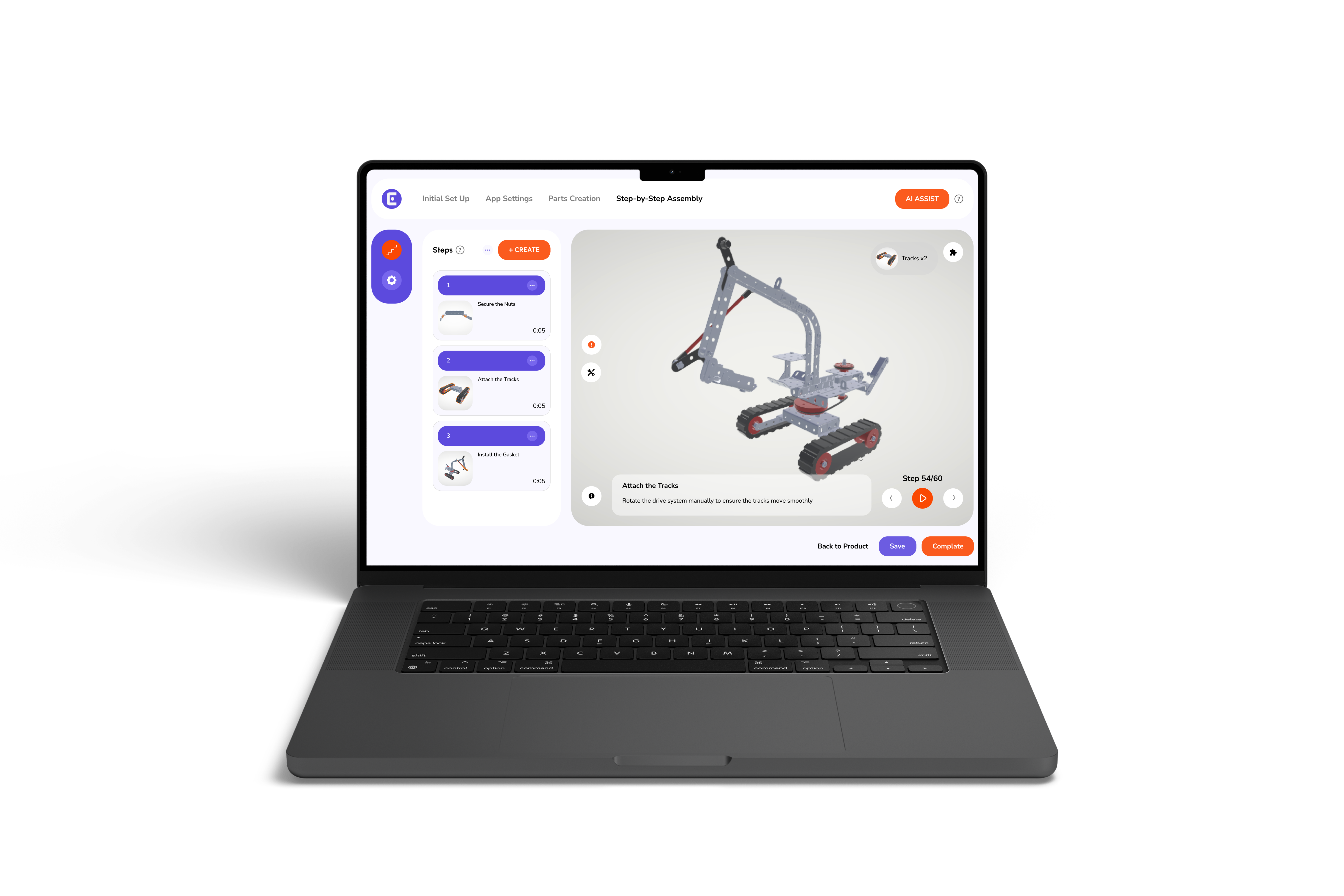
When combined with interactive 3D instructions, employees can rotate models, zoom in on specific parts, and move through instructions one step at a time.
The purpose is not to replace hands-on training. Instead, it prepares employees for practical work by helping them understand what they need to do before they begin.
Traditional training methods still have an important role in the workplace. However, they can make some technical tasks difficult to understand.
Consider an employee who needs to assemble a product with several components. A printed manual may show all the parts in one diagram, but the employee may still struggle to understand how those components fit together.
Some common training challenges include:
These challenges can lead to confusion, repeated questions, and avoidable mistakes.
Interactive training provides another way to explain procedures. Instead of asking employees to understand everything from a single diagram, it allows them to explore the task visually and follow clear instructions.
Interactive 3D instructions make simulated rehearsal easier by showing employees how a task should be performed.
Rather than reading several pages of instructions, employees can explore a digital model and follow the process at their own pace.
Here are four ways this approach supports employee training.
Before starting an assembly or installation task, employees need to recognize the different components and understand how they work together.
A 3D model makes this easier by showing the product from different angles.
Employees can:
This visual approach helps employees develop a clearer understanding of the product before handling its physical components.
It also makes interactive assembly guidance useful for products with complicated structures or multiple parts.
A long assembly procedure can be difficult to remember, especially for new employees.
A step-by-step training simulation makes the process easier to follow by showing one action at a time.
For example, an assembly procedure may include:
Employees can focus on the current instruction instead of trying to remember the entire procedure.
They can also revisit earlier steps whenever they need clarification.
This makes training easier to follow and helps employees understand the correct sequence of actions.
One of the main benefits of simulated rehearsal is that employees can become familiar with a procedure before working with actual products.
With a 3D training simulation, they can explore the assembly process digitally and understand how different actions affect the model.
For example, an employee learning to install a product can review the placement of different components and understand how they fit together.
They can repeat the instructions whenever necessary without using additional physical materials during the digital practice. This is particularly useful when training involves expensive components, complicated products, or procedures that require careful handling.
However, digital practice should be followed by supervised hands-on training where physical skills, tools, and safety procedures need to be learned.
Employees may forget certain instructions after a training session. When they cannot remember the correct procedure, they may need to ask a supervisor or search through a manual.
Interactive digital work instructions provide a visual reference employees can return to when needed.
They can review the relevant steps, inspect components, and check how a particular part should be positioned.
This makes information easier to access during both training and everyday work.
It also helps employees become more comfortable with procedures instead of depending entirely on verbal explanations.
Combining simulated rehearsal with interactive 3D instructions offers several practical benefits.
Another advantage is that training materials can be updated when procedures or product designs change. Employees can then access the latest instructions instead of relying on outdated printed materials.
Interactive employee training is useful in different industries where employees need to understand technical procedures or follow specific work instructions.
Manufacturing employees often work with products that contain several components and require specific assembly sequences.
Virtual assembly training allows workers to explore these procedures using digital models before working with physical products.
Manufacturers can use 3D instructions for reducing assembly errors by making component placement and assembly sequences easier to understand.
Installation employees need to understand how products are positioned, connected, and fitted at different locations.
Interactive 3D instructions for installer training can show how individual components fit together and guide installers through the required procedure.
This is particularly helpful when products have multiple installation steps or require specific positioning.
Employees responsible for operating or maintaining equipment need to understand different parts and procedures.
Interactive 3D models can help them identify components and review the correct sequence for particular tasks.
They can use these instructions as a learning resource before performing practical work under the appropriate supervision.
Choosing the right manufacturing training software can make it easier to introduce interactive instructions into existing training processes.
Businesses should consider a few important features:
The goal is to choose a solution that makes training easier to understand and use.
It is also important to remember that software alone cannot develop every practical skill. Employees still need appropriate demonstrations, supervision, and hands-on experience.
Easemble helps businesses turn complex product information and assembly procedures into clear, interactive 3D instructions that employees can easily follow.
With Easemble, you can create interactive digital assembly instructions that guide employees through procedures step by step. They can rotate models, zoom in on specific components, and review individual steps whenever they need clarification.
This allows new employees to become familiar with products and procedures before handling actual components. It also gives experienced workers an accessible visual reference when learning new processes or working with unfamiliar products.
Whether you need to train manufacturing teams, guide assembly workers, or prepare installers for product installation, we help make technical information easier to understand and follow.
Explore how Easemble can simplify your employee training with interactive 3D instructions.
Simulated rehearsal with interactive 3D instructions gives employees a more practical way to understand technical procedures before performing them in real working conditions. By exploring components, following step-by-step guidance, and repeating difficult tasks, employees can build familiarity with products and reduce confusion during assembly or installation.
However, digital training works best when combined with hands-on practice, demonstrations, and appropriate supervision. Businesses can use interactive 3D work instructions to make training more accessible, consistent, and easier to follow.
With Easemble, you can turn complex product information and work procedures into interactive 3D instructions that support employee learning.
1. What is simulated training?
Simulated training allows employees to practice work-related tasks in a digital or controlled environment before performing them in real working conditions.
2. How does a 3D training simulation help employees?
A 3D training simulation allows employees to explore product models, inspect components, and understand how different parts fit together. It makes technical procedures easier to understand through visual learning.
3. Can interactive 3D instructions reduce assembly errors?
Yes. Interactive 3D instructions can help reduce mistakes by showing employees the correct component positions, connections, and assembly sequence. However, results depend on instruction quality and proper employee training.
4. Is virtual assembly training suitable for new employees?
Yes. Virtual assembly training helps new employees become familiar with products and assembly procedures before handling actual components. It can be combined with practical demonstrations and supervised training.
5. Do interactive 3D instructions replace hands-on employee training?
No. Interactive 3D instructions support the learning process but do not replace practical experience. Employees still need to work with real equipment, learn physical techniques, and follow workplace safety procedures.
6. Can employees access digital assembly instructions during work?
Yes. When provided through compatible devices, digital assembly instructions allow employees to review procedures while working. This helps them check individual steps whenever they need guidance.