August 11, 2026
Static Documentation Wasn’t Built for Modern Users

.png)

Static documentation wasn’t built for modern users. Today’s customers, technicians, and assembly teams expect information to be easier to access, understand, and use. Instead of searching through long PDFs or printed manuals, users increasingly expect visual guidance, interactive elements, searchable content, and instructions that show them what to do at each step.
Static documentation is product or technical information presented in a fixed format, such as printed manuals, PDFs, diagrams, or traditional instruction sheets. While these formats can still provide important information, users must often interpret the content themselves and move between pages to find what they need.
Traditional technical documentation commonly includes:
The limitation is not necessarily the information itself. The challenge is how that information is presented.
A static diagram may show an assembly from one angle. A long paragraph may explain a complicated process. A user may need to move between several pages to understand which component belongs where.
Modern documentation approaches aim to reduce this friction.
Static documentation often assumes that users will read, interpret, and follow information sequentially. Modern users increasingly expect faster, visual, searchable, and interactive experiences.
Several changes have contributed to this shift.
Digital products have changed how people consume information. Search engines, interactive interfaces, video tutorials, and visual guides have made on-demand information part of everyday digital experiences.
When users encounter a complex product, they may expect the same accessibility from its documentation.
Instead of asking:
“Where is the instruction manual?”
they expect to ask:
“Show me how to complete this step.”
Interactive documentation can make that experience more direct.
Many modern products contain multiple components, moving parts, assemblies, and technical relationships.
A two-dimensional illustration may not always communicate how these parts fit together.
Interactive 3D documentation can allow users to rotate, zoom, isolate, and inspect components within a digital environment.
This can make complex product information more visual and easier to explore.
Traditional manuals are often structured like books. Users, however, frequently approach documentation with a specific question or task.
They may want to know:
Documentation designed around specific tasks can help users reach the relevant information more efficiently.
Interactive documentation presents technical or product information through digital elements that users can explore, manipulate, or interact with rather than simply reading fixed pages.
Depending on the product and platform, interactive documentation may include:
Instead of presenting information as a passive document, interactive documentation can turn it into an experience centered around the user's task.
For example, a user working with a complex assembly could rotate the model, zoom into a specific component, isolate individual parts, and follow instructions associated with that component.
This approach can connect digital technical documentation with the physical product.
A 3D model can provide multiple viewing angles that a single static image cannot.
Users can rotate the model to better understand how components relate to one another.
Rather than presenting an entire assembly at once, interactive documentation can progressively reveal the components involved in each stage.
This can make complex procedures easier to follow.
A component within a 3D model can potentially be linked to specifications, part numbers, instructions, or maintenance information.
The result is a more connected documentation experience.
Meanwhile, digital technical documentation allows product information to be updated, searched, distributed, and accessed across digital environments.
This can be particularly useful for products with:
Instead of maintaining information exclusively in printed manuals, companies can create digital documentation that can evolve alongside their products.
Technical documentation software is software used to create, organize, manage, publish, or deliver technical information.
Depending on the platform, it may support features such as:
The right solution depends on the company's products, documentation requirements, existing workflows, and users.
Interactive product documentation can organize information around what users are trying to accomplish rather than simply presenting a collection of pages.
For example, instead of providing a 40-page manual and asking users to locate the relevant section, an interactive system could guide them through a specific task.
A user might select:
Product → Component → Task → Step
This task-oriented structure can make documentation more accessible and easier to navigate.
Digital product manuals move product information from a fixed physical or PDF format into a digital environment that can support additional capabilities.
Traditional manuals may rely primarily on:
Digital manuals can potentially incorporate:
The goal is not necessarily to eliminate traditional documentation. Instead, digital formats can provide additional ways for users to access and understand product information.
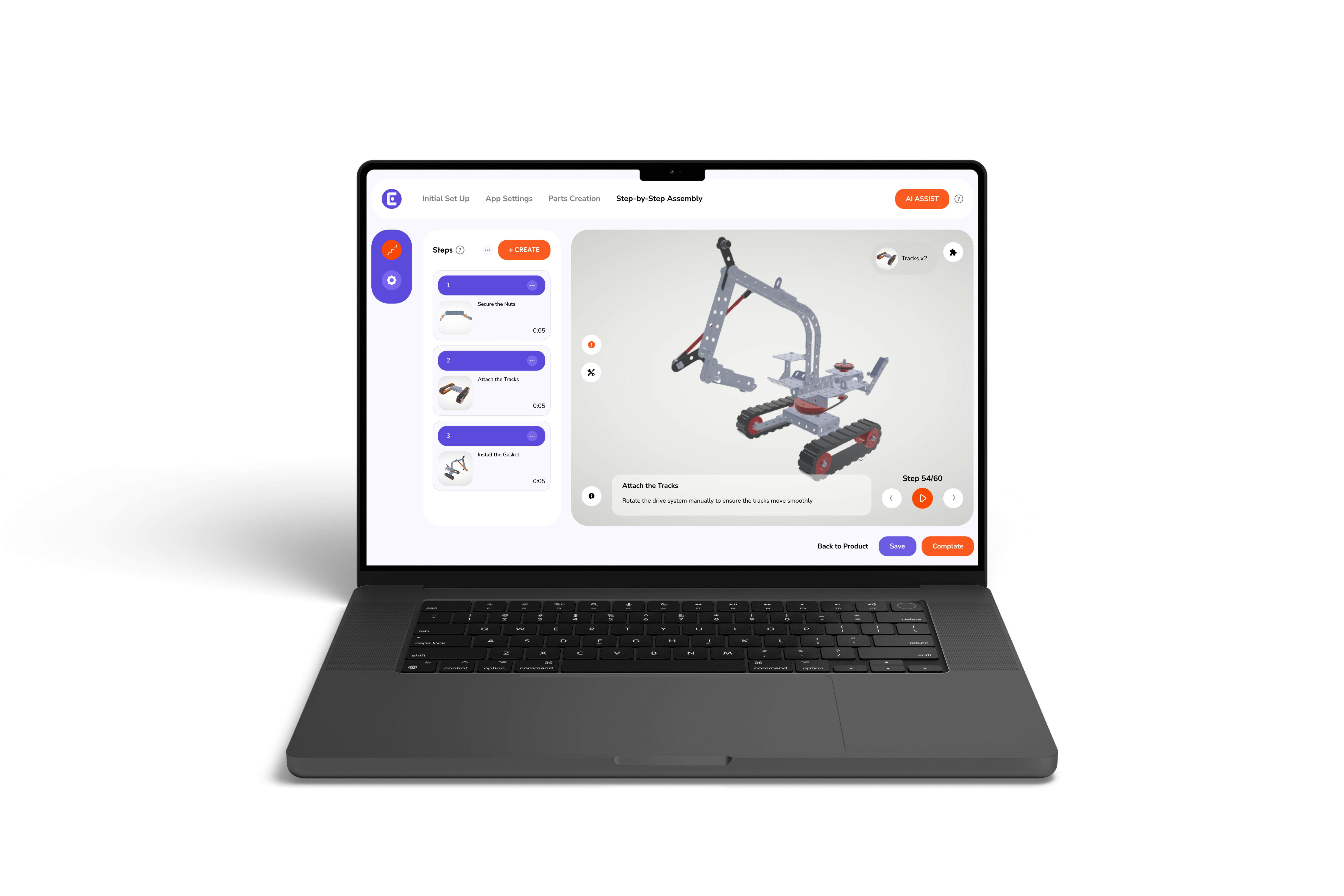
Interactive assembly instructions can guide users through an assembly process one step at a time while providing visual information alongside each instruction.
For example, an assembly interface could show:
This approach can reduce the amount of information users must process at one time.
For more on this approach, see our guide to step-by-step assembly instructions.
3D assembly instructions can provide a visual representation of how components fit together, making them particularly useful for products with complex structures or multiple parts.
A 3D assembly experience can allow users to:
When combined with written instructions, 3D visualization can provide both visual and textual context.
Interactive 3D assembly manuals combine 3D product models with instructions, animations, navigation, and other digital elements.
A typical workflow might look like:
Select Product → Select Assembly → View 3D Model → Follow Step → Inspect Component → Complete Assembly
This structure allows documentation to become more closely connected to the actual product.
Instead of asking users to interpret a diagram independently, the documentation can show the relevant part of the product directly within the instruction.
Step-by-step assembly instructions break a complex procedure into smaller actions that users can complete sequentially.
This approach can help prevent users from having to interpret an entire assembly process at once.
Effective instructions can combine:
The result is documentation structured around completing a task rather than reading a document.
Moving from static documentation to a digital or interactive approach requires more than converting PDFs into a new format.
Companies should consider:
User Needs: Identify who uses the documentation and what they are trying to accomplish.
Product Complexity: Determine whether the product would benefit from interactive diagrams, animations, or 3D models.
Content Structure: Technical information should be organized so users can find task-specific instructions quickly.
Existing Assets: Companies may already have CAD files, illustrations, product specifications, manuals, and other content that could support digital documentation.
Maintenance: Documentation should be structured so updates can be managed when products, components, or procedures change.
Accessibility: Digital documentation should be designed so users with different devices, technical abilities, and information needs can access the content effectively.
Static documentation is unlikely to disappear completely. Printed manuals, PDFs, and traditional technical documents remain useful in many situations.
The bigger shift is toward choosing the right format for the user's task.
A simple product may only require a concise digital manual. A complex industrial product may benefit from interactive diagrams, animations, or 3D documentation.
Modern documentation strategies can therefore combine traditional and interactive formats instead of treating them as competing options.
Static documentation wasn’t built for modern users who expect product information to be visual, accessible, and easy to use. As products become more complex, businesses need documentation that does more than present pages of text and static images.
This is where Easemble can help transform traditional technical documentation into more interactive and engaging digital experiences. By combining interactive 3D visualization with step-by-step guidance, Easemble helps make complex assembly and product information easier for users to understand and follow.
Whether you are exploring interactive 3D documentation, digital product manuals, or 3D assembly instructions, the goal is the same: give users clear, contextual information when they need it. With Easemble, companies can move beyond static manuals toward documentation designed around how modern users actually learn, assemble, and interact with products.