November 11, 2026
How Embedded Interactive 3D Instructions Help Increase Product Sales



Most online shoppers do not hesitate because of price alone. Often, they pause because they cannot picture how a product goes together or how hard setup will be. Adding interactive 3D instructions right on your product page removes that doubt before checkout.
Embedded interactive 3D instructions help increase product sales by letting shoppers rotate, zoom, and preview assembly steps directly on your product page. Seeing a clear, step-by-step build removes purchase hesitation, boosts conversion rates, and prevents costly assembly-related returns. Brands also cut support tickets by replacing flat PDFs with self-guided 3D steps.
A studio photo shows what a product looks like when someone else builds it. It rarely shows how much time, effort, or guesswork it takes to put together at home.
When shoppers feel unsure about assembly, they close the browser tab. That quiet hesitation costs online stores thousands of lost orders every month.
Adding interactive 3D product instructions bridges the gap between browsing and owning. Shoppers can inspect parts, check angles, and confirm they can handle the build before paying.
First, let’s look at why setup doubt stops so many buyers from clicking "Buy Now."
Online shoppers cannot pick up your product, test its joints, or inspect the hardware bag. When key setup details stay hidden, buyers assume the worst.
Research on online retail product displays shows that interactive displays generate a 54% higher purchase intention overall. That lift is even stronger on higher-cost items where buyers demand clear proof before spending.
Most product pages rely on five or six flat photos and a short text description. None of those assets show how brackets align or which tools are needed.
For example, a shopper looking at a modular desk or home rowing machine wants to know if setup takes twenty minutes or three hours. Hiding the manual inside the shipping box leaves that question unanswered.
An embedded 3D product viewer turns passive scrolling into hands-on exploration. Shoppers can spin the model, zoom into tight connections, and preview the build sequence in seconds.
Industry data shows that 82% of shoppers engage with a 3D view when available, 95% prefer interactive 3D over static video playback. Strong 3D product visualization ecommerce proves your product is thoughtfully designed and easy to assemble.
Now, let’s break down the exact ways this drives higher revenue across your store.
Many brands treat assembly manuals as a post-purchase cost. In reality, placing interactive product instructions on the product page improves revenue before and after checkout.
Effective product page optimization answers buyer objections right where decisions happen. Ecommerce benchmarks show that listings with interactive 3D visualization achieve an average 40% increase in conversion rates.
When visitors interact with a clear ten-step build preview, their confidence rises. That hands-on clarity removes friction and helps improve e-commerce conversion rates without discounting your prices.
A completed checkout only counts as revenue if the customer keeps the order. Ecommerce data shows that interactive 3D visualization can reduce product returns by up to 40%.
Many returns happen because a buyer reverses a part, strips a bolt, or gives up halfway through setup. Using interactive 3D assembly manuals prevents setup errors so customers keep their purchase and leave five-star reviews.
Shoppers rarely add extra attachments to their cart if they cannot see how those pieces connect. A 3D step can show exactly where an add-on shelf, rack, or accessory locks into the main frame.
Seeing how simple the upgrade looks makes bundles feel practical rather than complicated. That visual proof naturally lifts your average order value.
Every "where does this screw go?" ticket drains your support team’s time and shrinks your margins. Replacing paper booklets with interactive digital product manuals lets buyers solve setup questions on their own phones.
Customers who finish assembly smoothly are far more likely to trust your brand and order again. Next, let’s compare traditional manuals with interactive 3D guides side by side.
Understanding the benefits of interactive 3D instructions becomes much clearer when you compare them directly against paper booklets and flat PDFs.
Seeing the difference is one thing, but placement matters just as much. Let’s look at where to position these guides on your store.
You do not need a full website redesign to see results. When you embed interactive instructions on product pages, place them where shoppers naturally look for reassurance.
Choose a lightweight, browser-based 3D viewer that loads on demand when a shopper clicks to interact. Shoppers get smooth 3D controls on their phones without slowing down your product page.
Once your placement plan is set, the right platform makes building these guides fast and repeatable.
For brands selling products with complex components or assembly requirements, explaining how a product works can be just as important as showing how it looks.
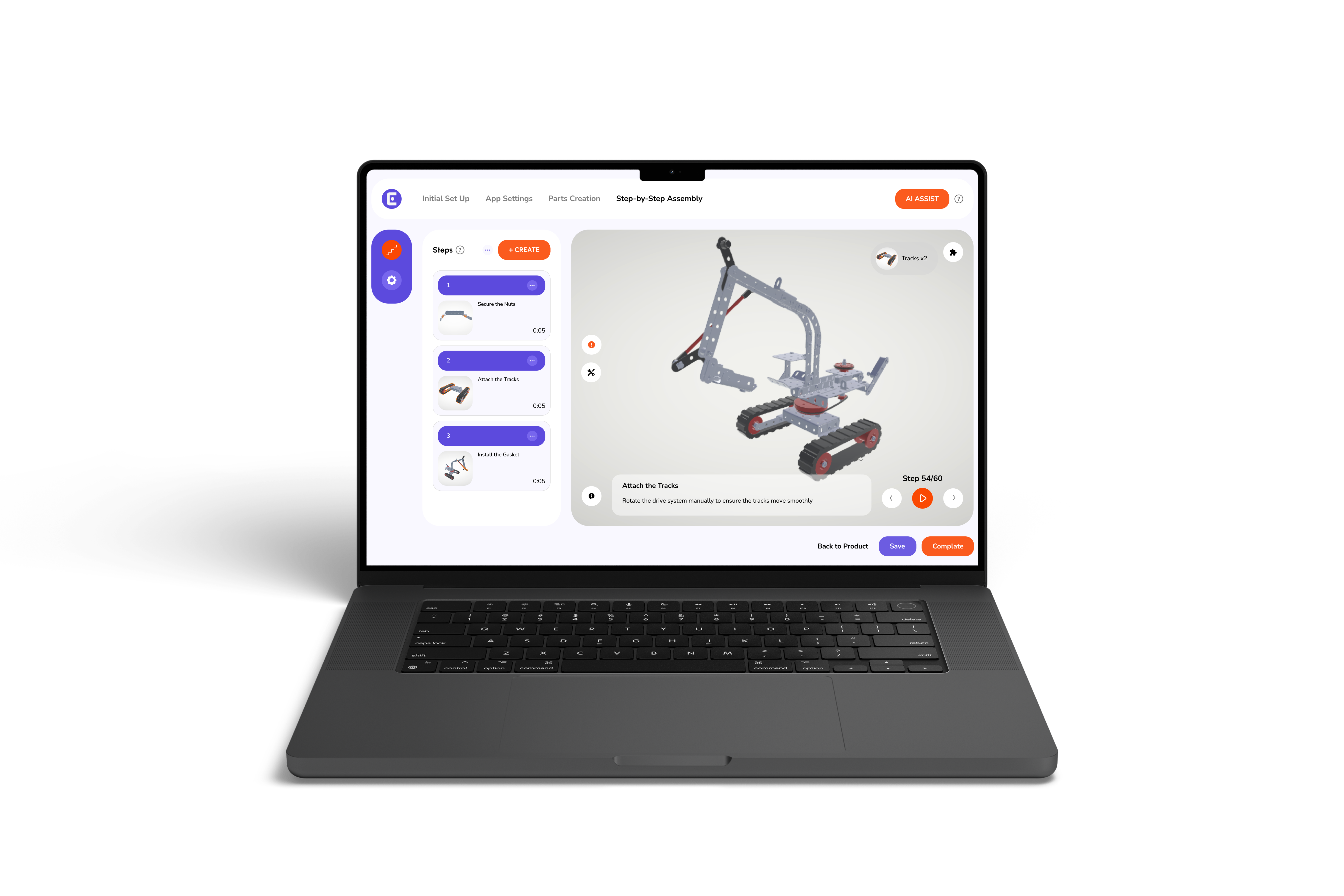
Easemble helps brands turn CAD models into interactive, step-by-step 3D assembly guides. Customers can rotate, zoom, and pan the product model, while brands can set a custom starting camera angle for individual instruction steps.
These guides can make it easier to explain product assembly and help customers explore components from different perspectives.
Rather than relying only on static diagrams or conventional manuals, brands can provide interactive guidance that makes product information easier to follow.
For ecommerce businesses, this creates an opportunity to bring useful product guidance closer to the purchasing decision. It also gives customers access to clearer instructions when they need to understand how a product fits together.
Explore Easemble's 3D Interactive solution to see how product models can become interactive assembly experiences.
Interactive 3D product instructions do more than simplify assembly. They help shoppers understand what they are buying, feel more confident about setup, and make informed purchasing decisions. By embedding interactive 3D instructions directly into product pages, ecommerce brands can turn product clarity into a better shopping experience while reducing assembly-related friction after delivery.
The opportunity is to make product information useful before and after checkout. Explore Easemble’s interactive 3D solution to see how clearer product guidance can support your ecommerce experience.
1. Can interactive 3D product instructions improve ecommerce conversion rates?
Yes. Interactive 3D instructions help shoppers understand product assembly, visualize components, and evaluate setup difficulty before purchasing, reducing uncertainty and encouraging conversions.
2. Do interactive 3D product guides work on mobile devices?
Yes. Browser-based 3D guides with responsive touch controls allow mobile shoppers to rotate, zoom, and explore product assembly steps without downloading an app.
3. How can 3D assembly instructions reduce product returns?
3D assembly instructions help customers understand part orientation, connections, and assembly sequences, reducing setup mistakes, frustration, and returns caused by assembly difficulties.
4. Can customers view 3D assembly instructions before purchasing?
Yes. Brands can embed interactive 3D instructions directly on product pages, allowing shoppers to preview assembly steps, inspect components, and understand setup requirements before checkout.
5. Do interactive 3D product instructions require a special app?
No. Many browser-based 3D instruction platforms work directly through a web browser, allowing customers to access assembly guides on smartphones, tablets, and desktops without installing an app.
6. How can ecommerce brands add 3D assembly instructions to their product pages?
Brands can convert product CAD models into interactive 3D assembly guides using specialized platforms and embed them into product pages, giving shoppers access to step-by-step product guidance.