September 23, 2026
The Best User Manual Creation Software in 2026 (Here's What Actually Works)
.png)

Modern user manual software transforms static documentation into interactive 3D guides, streamlining customer onboarding, factory workflows, and multi-device product support.
If you've ever handed a customer a manual and watched their eyes glaze over before they even opened it, you already know the problem. Manuals are supposed to help people, not confuse them further.
So, what actually makes user manual software worth using this year? In short, it's the shift from flat, static documents toward guides people can actually interact with. Below, we'll walk through what's changed, what to look for, and how to pick the right tool for your team.
Think about the last time you opened a PDF manual on your phone. Chances are, you had to pinch and zoom just to read a diagram that was too small to begin with. That's the core issue with traditional manuals: they were built for print, not for the way people actually consume information now.
Manufacturers are catching on. Static documents don't update easily; they're hard to search, and they rarely account for different learning styles. Some people want to read instructions; others want to watch a step happen. A PDF can't do both.
This is part of a bigger shift happening across the industry, one that touches the future of product documentation as a whole. Companies aren't just swapping formats; they're rethinking how instructions should work from the ground up.
Here's the thing: not all tools labeled as "manual software" actually solve the problem. Some just move the same static content online without changing how it works.
When you're evaluating user manual software, a few things matter more than the rest:
That last point matters more than people expect. If you can't tell where users get stuck, you're just guessing at what needs fixing.
In fact, Gartner reports that 73% of customers use self-service at some point during their support journey, making the quality and relevance of documentation an important part of the customer experience.
Here's a question worth sitting with: if you could show someone exactly how to assemble something, why would you describe it in a paragraph instead?
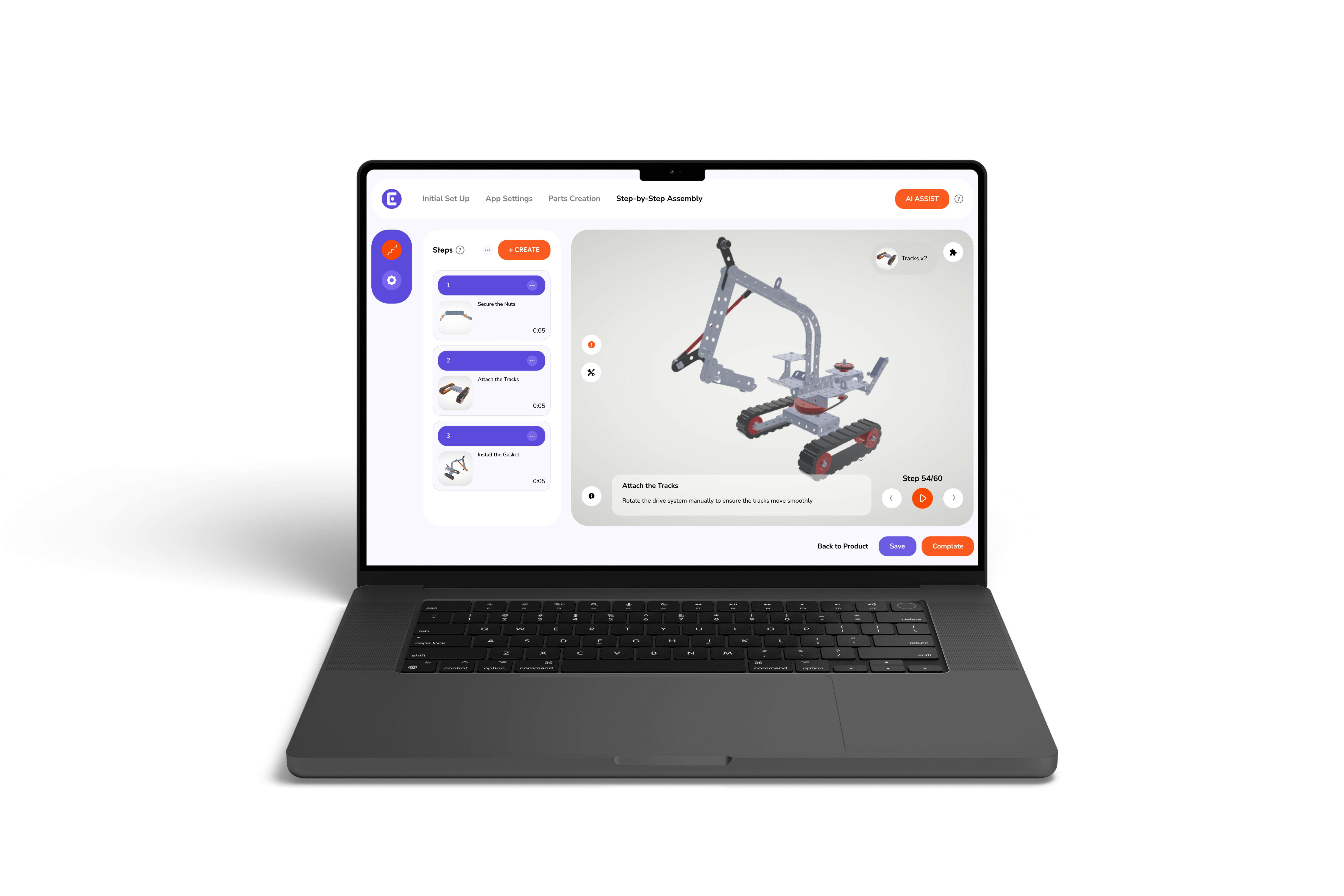
That's really the whole argument for interactive product guides. Instead of a wall of text, users get something closer to a walkthrough, often in 3D, where they can rotate a part, zoom in, or replay a step they missed. For companies building interactive assembly manuals for consumer electronics manufacturers, this isn't a nice extra. It's often the difference between a smooth setup and a frustrated support call.
Here's a quick side-by-side of what changes when a company moves from static to interactive:
None of this means static documents are useless. Some situations still call for a printable version, especially for compliance or warranty paperwork. But for day-to-day product use, interactive wins more often than not.
This is usually where teams get stuck. There are dozens of options, and most of them promise the same things in slightly different words. So let's actually name a few, since that's usually what people searching for this topic want to see.
A few platforms worth knowing about, depending on what you're building:
None of these are wrong choices. They just solve different problems. A software company writing setup guides has very different needs than a manufacturer building physical hardware, so the "best" option really depends on your product type first, not the feature list.
Here's how they generally compare:
A simple checklist still helps once you've narrowed the field:
If your product is mostly software or services, something like ClickHelp or HelpDocs will likely feel like enough. If you're shipping something people have to physically put together, that's usually where Easemble or Dozuki start to make more sense.
It's worth mentioning that manuals aren't only for customers. Factory floors and technical teams rely on digital work instructions just as much, sometimes more. A technician assembling a product needs the same clarity a customer does, just in a different setting.
This is where the conversation starts to overlap with broader tools like a top 10 best visual product configurator software of 2026 list. Configurators and manual creation software often solve related problems, helping people understand a product visually before or after it's built. If your team is evaluating one, it's worth glancing at the other too.
We noticed the same pattern showing up across manufacturers we spoke with. Teams wanted to move away from static PDFs, but most software either felt too complicated or didn't actually simplify anything for the end user.
That's the gap Easemble was built to close. We provide a platform for creating interactive 3D manuals that update in real time, work across devices, and don't require a technical background to build. Instead of writing paragraphs describing a step, your team can show it, step by step, in a format people actually want to use.
Manuals aren't just paperwork; they're often someone's first real experience with your product. Getting them right matters more than most companies give it credit for. The move from static PDFs to something people can actually interact with isn't just a trend; it's a response to how differently people learn and troubleshoot today.
Clarity, easy updates, and the ability to see where users get stuck all play a part in that shift, and so does recognizing that instructions matter just as much on the factory floor as they do in a customer's hands.
There's no single formula for getting this right, but the companies paying attention to how people actually use their manuals tend to end up with fewer support calls and fewer frustrated customers. That's really what good documentation comes down to: meeting people where they are instead of expecting them to adjust to the format.
Traditional PDF manuals are static, hard to search, unoptimized for mobile screens, and fail to provide interactive 3D or visual learning experiences.
Static manuals rely on text and flat images, while interactive manuals feature live 3D models, step-by-step animations, real-time updates, and mobile responsiveness.
Look for interactive 3D support, real-time content updates, multi-device mobile compatibility, team collaboration tools, and built-in analytics to track user engagement.
Digital work instructions improve assembly accuracy on factory floors by replacing complex text with clear, interactive visual steps that reduce human error.
Easemble allows non-technical teams to quickly build, update, and publish real-time interactive 3D user manuals accessible across any device without coding.