July 29, 2026
How Digital Work Instructions Improve Manufacturing Efficiency

.png)

Digital work instructions improve manufacturing efficiency by making assembly faster and more consistent. A manufacturing study found they reduced assembly time from 1,084.8 seconds to 599.4 seconds, highlighting the value of clear, step-by-step digital guidance.
The biggest production delays often come from the smallest instructions.
Most manufacturers spend heavily on equipment, automation, and process improvements, yet the documents guiding day-to-day work are often overlooked. When instructions are hard to follow, outdated, or disconnected from the task at hand, small mistakes build into slower production, inconsistent quality, and longer training times.
Interactive instructions address those gaps by bringing clear, visual, and up-to-date guidance directly to the point of work.
In this blog, we explore how digital work instructions improve manufacturing efficiency, where traditional methods hold teams back, what measurable improvements manufacturers are seeing, and how interactive tools are changing assembly, training, and continuous improvement.
The biggest production slowdowns rarely begin with a machine. They begin when someone hesitates over the next step.
On many shop floors, paper instructions are still the main source of guidance. But when a page is outdated, difficult to follow, or missing key visual detail, work slows almost immediately. Operators stop to double-check a step, ask a supervisor for help, or undo work that was completed incorrectly. Those delays may seem minor, yet repeated across dozens or hundreds of assemblies, they quietly reduce output and increase costs.
This becomes even more noticeable during the challenges of assembling electronics, where precision leaves little room for guesswork.
A small gap can interrupt an entire workflow. One unclear diagram or missing note forces workers to pause instead of progressing confidently. That lost time carries into the next unit, affects handoffs, and makes consistency harder to maintain across shifts.
The numbers back this up. In a controlled manufacturing study, digital work instructions reduced average assembly time from 1,084.8 seconds to 599.4 seconds, showing how clearer, guided workflows can improve efficiency in day-to-day production.
The same study also reported fewer errors and far less need for operator assistance, highlighting the broader benefits of digital work instructions.
The real issue is not just speed. It is keeping production moving without unnecessary interruptions. Once instructions become easier to follow, teams spend less time seeking answers and more time building.
That raises an important question: what do 3D work instructions actually do differently from paper?
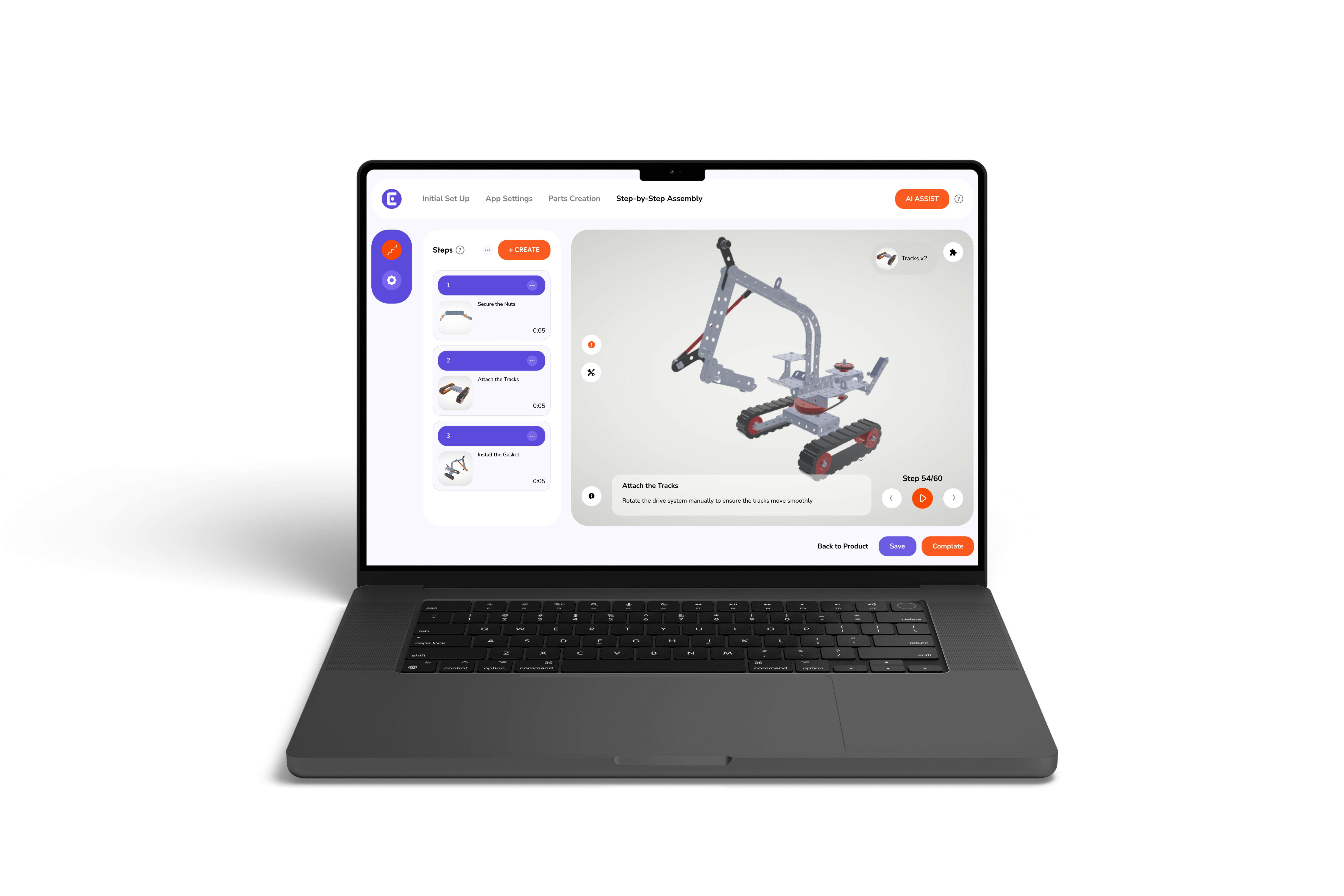
These work instructions do more than replace paper. They present information in a way that is easier to understand, trust, and repeat, especially when products or processes become more complex.
Visual guidance removes guesswork. Instead of interpreting static drawings, workers can clearly see the part, its orientation, and the correct sequence. That helps different operators complete the same task consistently with fewer interruptions.
Interactive instruction manuals guide users step by step with visual cues and focused part views. This is especially useful in 3D assembly manuals for electronics equipment, where similar-looking components and limited space make precision essential.
3D interactive work instructions also help workers focus on one action at a time instead of searching through an entire page.
A 3D animations feature shows how parts rotate, align, or fit together before the next step begins. That makes difficult assembly actions much easier to understand than flat images alone.
Electronics work depends on accuracy. Digital work instructions reduce missed steps and incorrect part placement by showing exactly what needs to happen. Keeping instructions clear is important, but keeping them current matters just as much.
Digital work instructions stay useful because software makes updates faster, cleaner, and easier to control. In manufacturing, that matters just as much as writing the guide in the first place. A clear manual loses value fast if the product changes and the document does not.
Here is where software changes the game:
That kind of control keeps work aligned when product runs shift, parts change, or a small fix needs to reach the floor quickly. It also gives managers a simpler way to check what is live and what needs to review.
For teams using 3D interactive work instructions, the benefit goes even further because visual steps can stay tied to the latest product version instead of sitting in an outdated file.
Tip: Keep one approved source for every instruction. Multiple versions, whether printed or shared separately, make mistakes much more likely.
When the guide stays current, the floor stays calmer. Moving on, we will explore how that shows up in time saved, fewer errors, and less back-and-forth.
The first signs of improvement usually appear on the production floor, not in a monthly report. Work flows with fewer interruptions, supervisors answer fewer repeat questions, and teams spend more time building than clarifying.
These are some of the earliest benefits of digital work instructions.
These improvements are not about working faster for the sake of speed. They come from removing unnecessary pauses and uncertainty from everyday tasks.
When teams spend less time correcting mistakes and more time moving through the process, productivity improves naturally. The next step is choosing a platform that makes those improvements easy to maintain as products and processes continue to change.
Easemble helps manufacturing teams build and manage digital work instructions without slowing down the people who use them. That matters because the real challenge is not creating one good file.
It is keeping instructions clear, current, and usable as products and processes keep changing.
What stands out most is the day-to-day control. Easemble gives teams a cleaner way to manage instruction changes, keep the floor aligned, and reduce the small friction that adds up over time.
That is where a digital assembly solutions provider makes a real difference. It turns instruction work into a steady process, not a file that keeps drifting out of date.
For busy operations, that kind of stability is the point. It helps the people building, training, and supporting the process stay focused on the work itself.
Manufacturing efficiency improves when people spend less time interpreting instructions and more time doing the work correctly.
Digital work instructions reduce confusion, stay aligned with product changes, and help teams maintain consistent performance across training, production, and quality. The goal is not to add more documentation. It is to provide better guidance where it matters most.
If your current instructions are slowing the floor down, it may be time to see how a digital approach can help your operation run with greater consistency and control.
Contact Easemble today to get rid of what's bringing your efficiency down.
Yes. These instructions combine clear steps with visual guidance, making it easier for new operators to understand the task, build confidence, and become productive sooner.
Yes. Consistent instructions reduce missed steps, incorrect part placement, and unnecessary rework. Everyone follows the same approved process, leading to more consistent quality across shifts.
3D interactive work instructions are especially valuable for complex assemblies where part orientation, tight spaces, or precise sequencing matter. They help workers visualize each step before performing it, reducing confusion and assembly errors.