August 21, 2026
Interactive 3D Presentations: Engaging Your Audience Like Never Before
.png)

Replacing static slides, web-based models let prospects self-inspect details, streamlining technical onboarding, clarifying intricate features, and eliminating friction across sales decks, trade shows, and e-commerce platforms.
Nobody remembers the fourteenth slide. If your presentation depends on someone staying locked in through twenty static slides, you've already lost half the room, and you probably know it. The uncomfortable part is that most teams keep building presentations exactly this way anyway.
Here's the thing though: audiences haven't gotten harder to reach; presentations have just stayed the same while everything else moved on. Interactive 3D presentations flip that script.
Instead of watching a product, viewers get to spin it, zoom into it, and poke around it themselves. That shift, from passive watching to active exploring, is what this blog is about.
We'll look at why static formats are losing their grip, what actually makes 3D presentations different, where they work best, and how to start building them without overhauling your entire workflow.
Attention is a finite resource, and most presentations spend it badly. A wall of bullet points asks a lot from the brain: read, process, remember, repeat.
However, the moment something moves or responds to a click, the brain treats it differently. It pays attention because there's a small, built-in expectation that something might change next.
This isn't a new discovery. Trainers and marketers have known for years that static content fades fast. What's changed is the tooling. 3D visualization used to require a specialist with expensive software and weeks of lead time.
Now, interactive presentation technology has gotten simple enough that a marketing team or a product manager can build something interactive without touching a line of code.
You might be wondering if this is just a fancier word for "adding a video" to your slides. It isn't, and the difference matters.
A video plays the same way every time, for everyone. An interactive 3D presentation responds to the person watching it. They choose what to look at first. They rotate a product to see the back panel.
They click a hotspot to open a spec sheet instead of scrolling through fifteen slides to find it. That small bit of control changes how people process information, because they're no longer just receiving it, they're actively looking for it.
This is where interactive product guides come in as a natural companion to 3D content. Instead of a static manual sitting in a PDF nobody opens, the same information gets embedded directly into the model itself. Someone exploring a machine part can tap on it and immediately see how it works, what it's made of, or how to maintain it.
A few things tend to stand out once teams make the switch:
Not every presentation needs a 3D layer. A quarterly earnings update probably doesn't. But anything involving a physical product, a process, or a piece of equipment tends to benefit almost immediately.
E-commerce deserves a closer look here, honestly. Online shoppers can't pick a product up and turn it over the way they would in a store, and that gap is exactly where purchase hesitation creeps in.
3D interactive assembly in e-commerce closes that gap by letting a shopper see how a product actually goes together before it shows up at their door. Fewer surprises tend to mean fewer returns.
In 2026, research on 3D product visualization reports that interactive 3D can increase e-commerce conversion rates by up to 40% compared with static product pages.
Interactive 3D presentations also change how sales teams pitch. Instead of describing a feature, a rep can hand control to the prospect and let them find it. That's a small shift, but it moves the conversation from "trust me" to "see for yourself."
We noticed something fairly consistent while working with manufacturing and product teams: most companies already have the 3D files they need, whether it's CAD data or existing product models. What they don't have is an easy way to turn that data into something a customer or trainee can actually interact with.
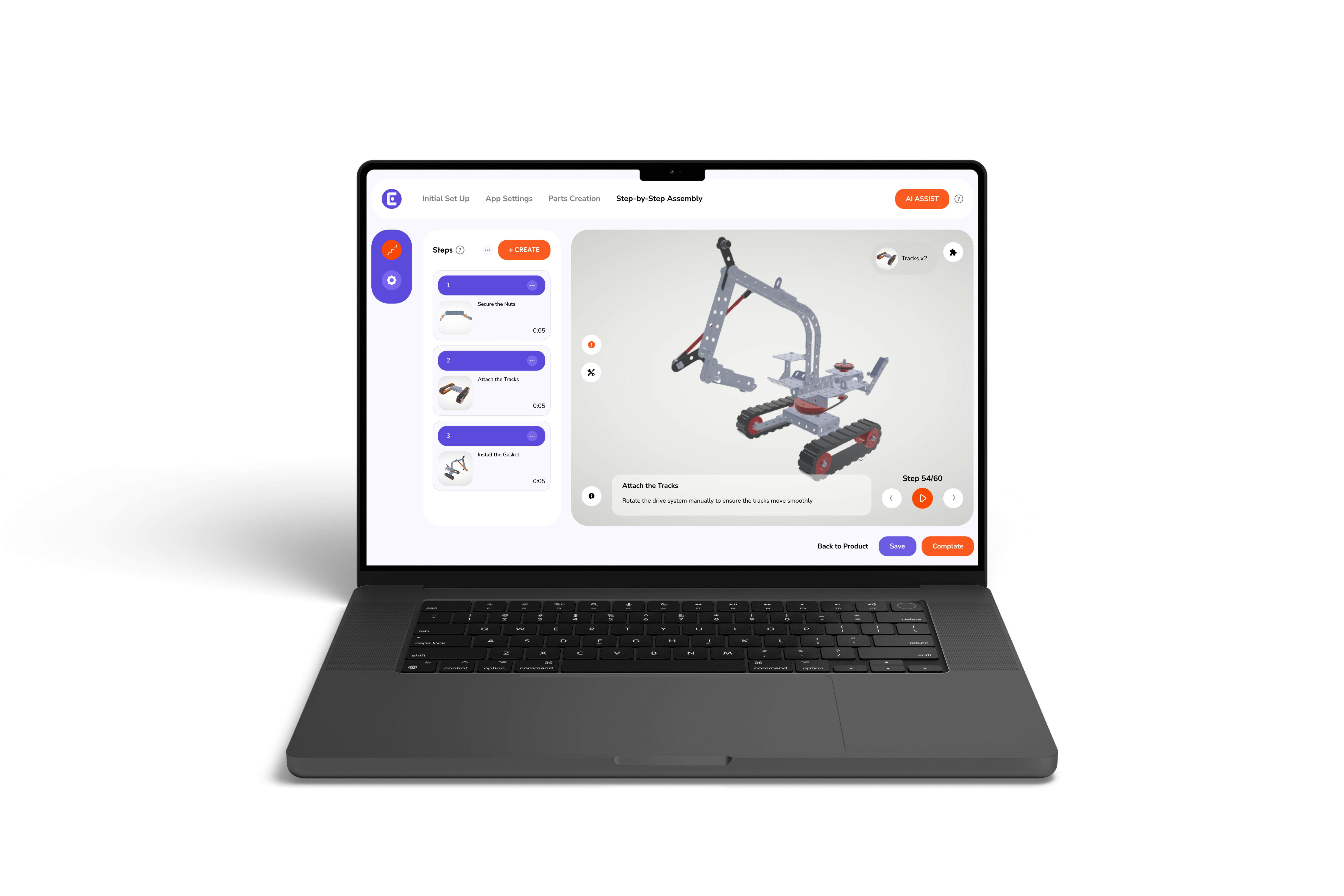
That's the gap our platform is built to close. Instead of requiring a design team to hand-build every interactive element, Easemble turns existing 3D files into presentations, digital assembly instructions, and product walkthroughs that update automatically as the underlying model changes. If a part gets revised, the presentation reflects that without someone manually rebuilding slides.
This matters most for teams trying to create effective 3D assembly manuals without hiring outside developers every time something changes. A few things our platform focuses on:
Static presentations aren't going away entirely, but on their own, they've stopped being enough. Interactive 3D presentations give audiences something a slide deck simply can't offer: the chance to explore instead of just watch. That shift, from telling someone about a product to letting them find things out for themselves, is what makes the difference stick.
If your team is still leaning on static slides or PDF manuals for something as visual as a physical product, it's worth pausing and asking what an interactive version would actually change.
More often than not, the answer becomes obvious the moment someone gets to explore it on their own instead of being walked through it.
What is an interactive 3D presentation?
An interactive 3D presentation lets viewers rotate, zoom, and explore 3D product models in real time rather than viewing static slides.
How do interactive 3D presentations improve audience engagement?
They turn passive viewers into active explorers, granting control to inspect features directly, which drastically increases focus and information retention.
Why are static slides losing effectiveness for product presentations?
Static slides rely on heavy text and fixed images, which fail to capture attention or clearly explain complex physical products.
How does interactive 3D content impact e-commerce sales and returns?
Interactive 3D allows shoppers to thoroughly inspect items, boosting conversion rates by up to 40% while significantly reducing product returns.
How does Easemble simplify building 3D presentations from CAD files?
Easemble automatically converts existing CAD files into web-based, interactive 3D presentations and digital assembly instructions without requiring any custom coding.