September 25, 2026
Digital Assembly Manuals for Sports Equipment Brands
.png)

A digital assembly manual for sports equipment is an interactive digital guide that replaces or enhances traditional printed instructions, making products easier to assemble and understand. It typically lets users rotate a 3D model, zoom into specific connections, and follow step-by-step guidance on a phone or tablet, making it easier to assemble complex products like trampolines, playground structures, and home gyms correctly.
For a sports or outdoor equipment brand, the assembly manual is part of the product experience long after the box leaves the warehouse. A trampoline, playground system, home gym, basketball hoop, turf system, or outdoor fitness product can contain dozens of components that have to be positioned, connected, tightened, or installed in a particular sequence. The customer or installer is not simply reading instructions. They are translating a flat document into a physical product that exists in three dimensions, and a diagram does not always make orientation or connections obvious.
As product lines expand, the documentation challenge grows with them: more SKUs, more configurations, regional versions, updated components, and more instructions to keep current. A digital assembly manual gives manufacturers another way to communicate that information. Interactive 3D instructions can make complex products easier to understand while giving documentation teams a more flexible way to manage guidance. This makes it as much a software and operations consideration as a design one. The opportunity is not simply to replace paper. It is to build a clearer connection between the product, its instructions, and the experience that follows purchase.
Assembly documentation is often treated as a technical afterthought. From the customer's perspective, it is part of using the product. A customer who opens a box containing dozens of parts does not automatically know which component belongs to which step, and an installer working on outdoor equipment needs to understand not just what connects to what, but the orientation, sequence, and location of each piece.
For manufacturers, that makes documentation relevant across several parts of the business:
The stakes are highest for equipment where incorrect assembly or installation carries a safety risk. The CPSC Public Playground Safety Handbook states plainly that installers should strictly follow the manufacturer's instructions when assembling and installing equipment, and that those instructions should be kept on file. A manual, in other words, has a job beyond explaining where a screw goes. It has to communicate the manufacturer's intended process clearly enough that someone unfamiliar with the product can follow it correctly the first time.
Printed manuals and PDFs are not inherently a poor format. They remain useful, familiar, printable, and in some cases required by customers, installers, or regulators. The challenge arises when a physical product becomes too complex to explain clearly through static illustrations.
Consider a trampoline, where the assembly manuals may need to cover the frame, springs, enclosure poles, safety net, and accessories across several stages of assembly, or a playground system with multiple structural elements and installation requirements. In each case, the user is looking at the actual product from one angle while the manual shows a diagram from another, and that mismatch creates real uncertainty: which direction a part should face, whether a connection point is correct, or what the assembly should look like at a given stage. The problem gets worse when a product has several configurations or parts that look nearly identical, which is one reason sports and outdoor brands are exploring more visual documentation rather than relying only on static diagrams.
A digital assembly manual is product documentation delivered through a screen rather than only as a printed document. A manufacturer might offer a downloadable PDF, an online version of a traditional manual, instructional videos, or fully interactive 3D assembly instructions, and these formats are not interchangeable. A PDF transfers the familiar document experience to a screen. A video shows the assembly process as a recorded sequence. An interactive 3D manual gives the user room to explore the product model and move through specific steps at their own pace. This tends to be the most useful approach for complex sports and outdoor products, since the product itself exists in three dimensions and a flat page was never going to represent it fully. The goal is not to make every manual interactive just because the technology exists. It is to use the format where it solves a real documentation problem.
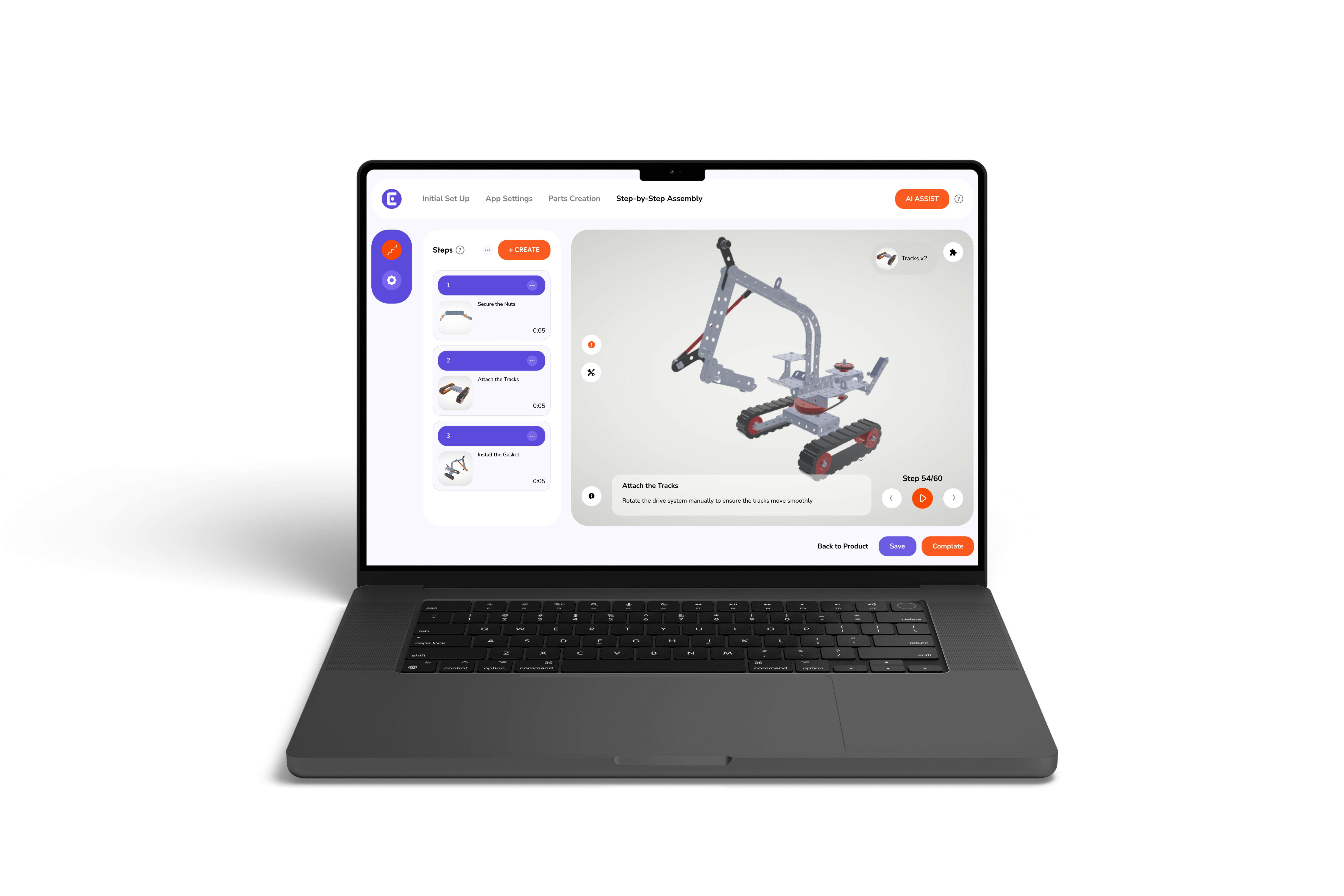
Interactive 3D instructions change how a user interprets an assembly step. Instead of viewing one fixed illustration, the user can rotate the product, zoom into a connection, or move through the sequence one step at a time. Easemble's 3D interactive assembly feature is built around this kind of interaction, letting users inspect a model from different angles while following structured, step-by-step guidance.
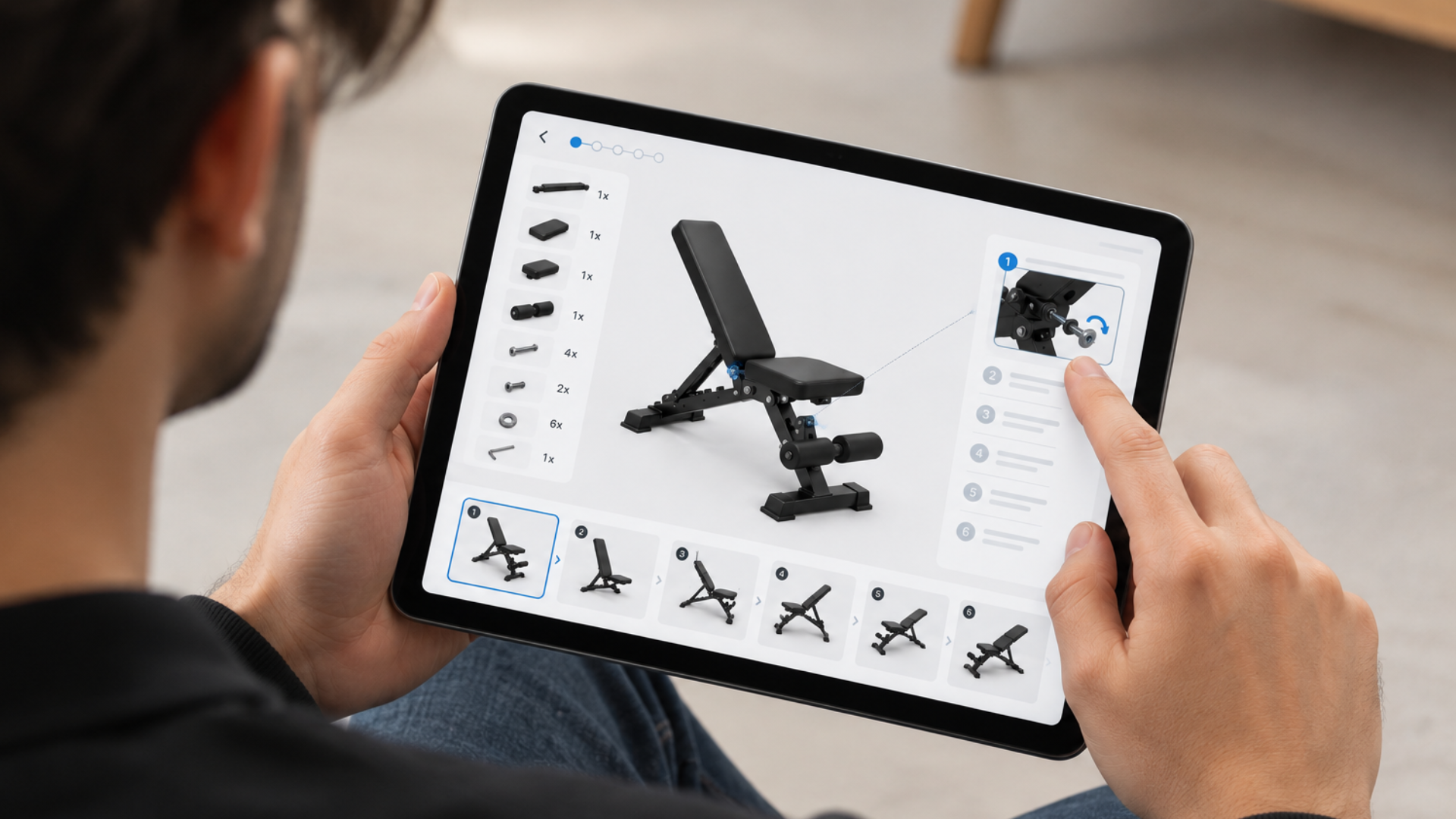
The practical value is easiest to see against a real product. In a home gym where a cable has to pass through a specific pulley arrangement, a static image can show the intended path, but a model the user can rotate gives another perspective on the same connection. On a play structure where several similar components are installed in different positions, being able to isolate and identify the relevant part makes the relationship between the instruction and the physical product easier to follow. This matters most when the challenge is not knowing what to do next, but understanding how the physical parts actually relate to one another.
The phrase “outdoor sports gear setup guide” might sound like a customer-facing instruction sheet, but for manufacturers it represents a larger product information problem. A useful setup experience has to connect several pieces of information: the product, its parts, the assembly sequence, any warnings, and the final configuration. For a simple product, a few printed pages cover that chain easily. For a larger product family, the documentation has to account for variation across models, components, accessories, and installation environments, and digital documentation provides a more flexible layer between the physical product and the information supporting it. Easemble's Sports and Recreation industry overview covers several of the categories below in more depth.
Trampolines. Frame, spring, mat, enclosure, and safety net components vary across product sizes and configurations, and an interactive guide helps users see how each part relates to the finished structure while moving through the process in order.
Playground Equipment. Larger structures and more components mean the documentation needs to communicate positioning and sequence, not just individual fastening steps.
Outdoor Fitness Equipment. Frames, handles, and mounting components often require specific positioning, and interactive instructions make orientation easier to understand from more than one angle.
Golf and Turf Systems. These products involve larger systems, multiple components, and installation processes that differ from assembling a small consumer item, often carried out by a dealer or installer rather than an end customer. Easemble's customer story on TurfHound's golf surface installation shows the platform being used to centralize that kind of installation documentation.
Home Gyms and Fitness Equipment. These combine frames, cables, weights, and fasteners, and interactive visual guidance is useful precisely when the difference between two assembly stages is hard to communicate through a single static image.
Other Sports Equipment. The same principles apply to basketball hoops, bicycles, table tennis equipment, and camping products, wherever setup involves several components. Not every product needs a 3D manual, but where orientation, part identification, or sequence creates confusion, interactive documentation is worth considering.
It is a mistake to evaluate digital manuals only from the user's point of view. For a manufacturer, documentation is also an operational asset. A product can change after its original manual has been published: a component gets revised, a step needs clarification, or a new model introduces a different sequence. Supporting several markets adds language and version management on top of that.
A digital documentation workflow makes those changes easier to manage when the underlying platform is built for it. Easemble's interactive assembly manual creation and publishing process describes that workflow: import a model, build the steps, then publish from a single source, so updates can be made without manually replacing files across different access points. None of this means abandoning traditional formats. A manufacturer can still offer PDFs or printed materials alongside the interactive experience.
Before choosing a platform, product, and documentation, teams should evaluate the workflow rather than focusing on individual features in isolation.
Easemble is a platform built around turning 3D product models into interactive, step-by-step assembly experiences, and its relevance to sports and outdoor brands shows most clearly through its work with products like trampolines, playground equipment, and outdoor fitness gear.
The EXIT Toys case study is a concrete example. EXIT Toys, a manufacturer of trampolines, playgrounds, playhouses, and other outdoor products, uses Easemble for interactive 3D instructions that let customers rotate the model, identify parts, and follow steps on their own devices, illustrating where interactive documentation makes sense: products complex enough that customers genuinely benefit from seeing the components fit together in three dimensions.
For a sports equipment manufacturer, the bigger question is not whether a 3D manual looks more modern. It is whether the format makes the product easier to understand while giving the documentation team a manageable way to maintain instructions as the product evolves.
An online version of setup or installation documentation, ranging from a simple PDF to interactive, step-by-step instructions that let users inspect parts, orientation, and connections from different angles.
They give customers and installers easier access to instructions while giving manufacturers a more flexible way to manage documentation across different models, instead of a separate static manual for every variant.
Not necessarily. A 3D manual can complement printed or PDF documentation rather than replace it outright, since some products and markets still require a printable option.
Product complexity, whether 3D support is available, mobile accessibility, SKU management, how revisions are handled, PDF support, language requirements, publishing options, and analytics.
Yes, on a platform designed for it. Instructions can be organized around individual products or configurations, so a user sees guidance relevant to the equipment in front of them.
Start by identifying where users struggle with the current instructions, whether that is part identification, orientation, or trouble finding the right version for their model, then weigh whether interactive visuals, mobile access, and easier update workflows address those specific problems.
A code generated for a specific product is placed on packaging or a label, and scanning it opens the interactive manual directly, usually in a mobile browser rather than a separate app. Because the code points to content rather than a fixed file, the instructions behind it can be updated without reprinting anything.
For sports and outdoor equipment brands, better assembly documentation is not simply about replacing a paper booklet with a digital file. The real opportunity is making the relationship between the physical product and its instructions easier to follow. A traditional PDF remains appropriate for a simple product. For equipment with many components, complex orientation, or detailed installation sequences, interactive 3D guidance adds a level of clarity a flat page cannot.
The strongest approach starts with the product itself: identify where customers, installers, or support teams actually struggle, determine what information they need at each stage, and choose a format that communicates it clearly and can be maintained as the product changes.