May 25, 2026
Unboxing the Feedback Gap: How 3D Assembly Guides Outperform the Traditional Paper Manual

.png)

A sale can look perfect on a dashboard and still fall apart on a living room floor. The product has arrived, the customer is ready, and the only thing guiding them is a paper manual that cannot see, hear, or learn from what happens next.
That is the feedback gap. If the customer gets stuck, rereads a step, or misidentifies a part, the paper guide stays silent. It gives instructions, but it gives the brand no signal about where the experience broke.
That is where this blog starts: the unseen space between delivery and successful assembly, where customer confusion becomes support tickets, returns, and review damage before the brand even knows what happened.
So, the real question is simple: if your customer struggles during assembly, would your manual even know where it happened?
Brands can track sales, returns, reviews, and support tickets. But the actual assembly experience often stays hidden. A customer may spend twenty minutes on one step, turn a part the wrong way, or abandon the process entirely, and a paper manual will never report that moment back.
The sale is visible, but the struggle is not
Most companies know when a product sells and when it comes back. What they rarely see is what happens between those two points. That space matters because it is where confusion builds, patience drops, and the customer starts deciding how they feel about the product.
Paper manuals can tell customers what to do, but they cannot show brands:
That gap matters because one poor experience can be enough to change customer behavior. PwC found that 32% of customers would stop doing business with a brand they loved after one bad experience. Assembly may seem like a small part of the journey, but for many customers, it is the first real test after purchase.
When the same complaint keeps showing up, it is easy to assume something is wrong with the product. Customers mention “bad parts,” “missing screws,” or “misaligned pieces,” and the first instinct is to check manufacturing, packaging, or quality control. Sometimes that is the right move. But not always.
A support ticket does not always explain the root cause. It tells you what the customer thinks went wrong. If someone cannot make two parts fit, they may call it a defect. In reality, they may have misunderstood the step because the manual did not show the angle clearly enough.
A flat diagram may make two sides look identical, hide depth, or fail to show rotation. The product may be fine, but the instruction creates the mistake.
For example, if a bracket looks symmetrical in a 2D drawing, customers may install it backward and report that it does not fit. The issue may not be the bracket. It may be the guide failing to show orientation clearly.
Once assembly moves into a digital guide, the brand gets something paper could never provide: behavioral signals. Instead of waiting for complaints after the fact, teams can see where customers slow down, repeat actions, or leave the guide.
Support complaints usually arrive after the damage is done. Assembly analytics show what happened before that point. They reveal how people actually move through the guide, not just what they say when they are already stuck.
A digital assembly guide can help teams track:
This data turns vague complaints into specific fixes. If one step causes repeated pauses, the instructions can be clarified. If one part keeps getting revisited, it may need a better angle, highlight, or animation. Instead of treating every support issue as a separate problem, brands can improve the source of confusion.
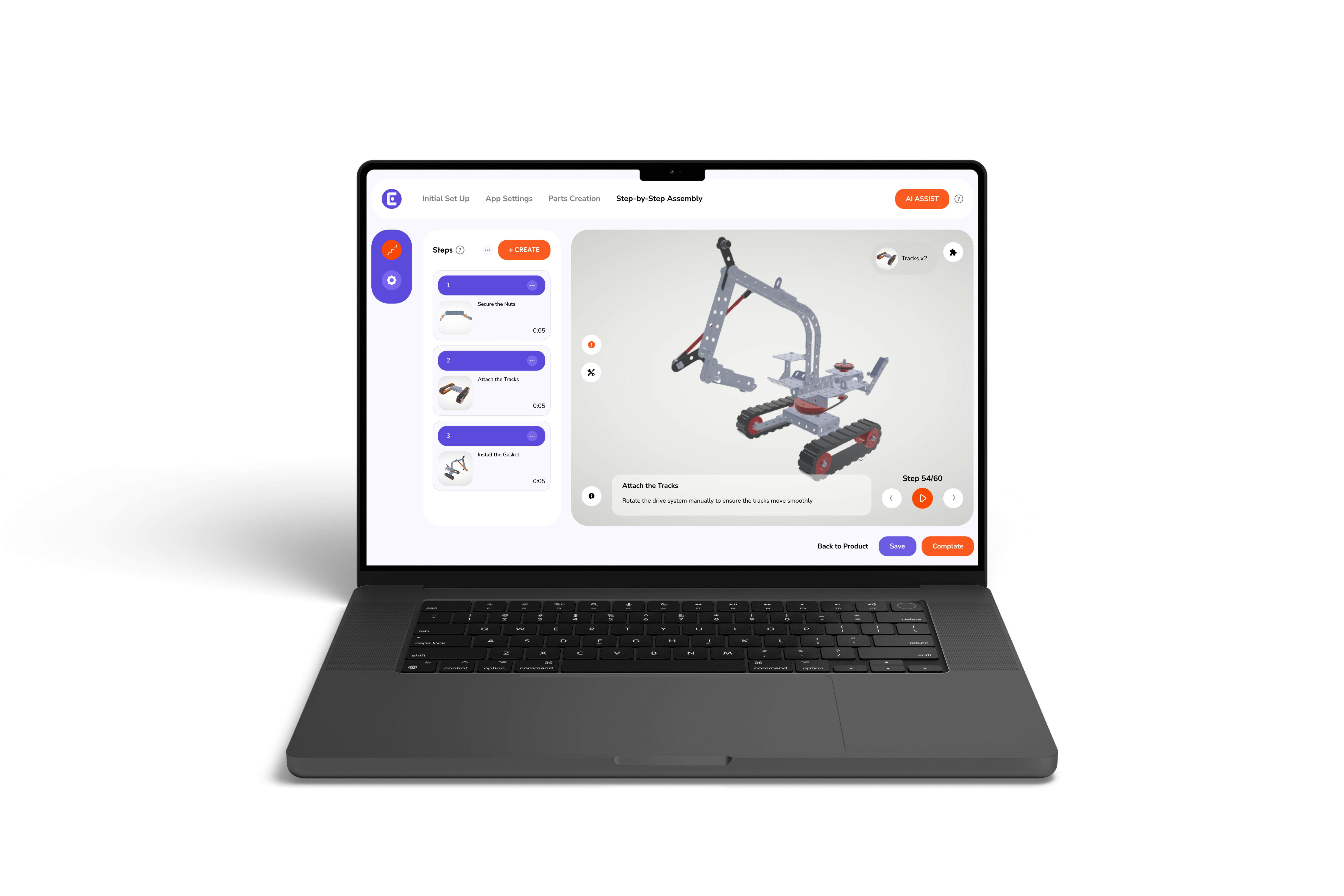
A 3D assembly guide is not just a prettier version of a paper manual. The real difference is what it helps the customer understand and what it helps the brand learn. Paper shows a fixed version of the step. A 3D guide can show space, direction, sequence, and fit in a way that feels closer to the real build.
When a customer can rotate a part, zoom into a connection, or watch the next motion, the step becomes easier to understand. That reduces guesswork during assembly and gives the brand a clearer view of how the guide is being used.
Products change, customers reveal patterns, and unclear steps need updates. Paper freezes the experience on print day. Digital assembly instructions keep adjustable after launch.
Assembly feels harder when the customer must translate a flat drawing into a real object. They are holding a physical part, turning it in their hands, and trying to match it with a small diagram that may not show depth, angle, or orientation clearly.
Two parts may look almost the same on paper but fit very differently in real life. When the guide does not show enough detail, the customer has to guess, test, undo, and try again.
3D guidance removes much of that effort. Customers can zoom in, rotate the model, follow the animation, and see highlighted parts before they act. Instead of asking, “Is this the right way?” they can see what goes where and how it should fit.
When the build starts making sense, the customer feels capable instead of stuck. That small emotional shift matters. A smoother assembly experience can influence reviews, referrals, and how the customer remembers the brand after the product is complete.
Better assembly data points to specific moments that need attention. When brands can see where people slow down, repeat actions, or drop off, they can improve the guide before the same issue turns into more tickets, returns, or complaints.
A confusing step rarely affects only one metric. It can create support tickets, delay assembly, trigger complaints, or make a good product feel harder to use than it really is. Assembly analytics help teams connect those signals to the exact part of the guide that needs work.
These figures are directional benchmarks based on research around digital work instructions, AR-assisted assembly, and self-service support patterns. Actual results depend on product complexity, customer skill level, and the quality of the original instruction.
One unclear step can create the same problem for hundreds of customers. Fixing that step once can reduce repeated support issues, improve completion rates, and make the product feel easier to use at scale.
Easemble looks at assembly as part of the customer experience, not as a booklet that disappears into the box. Once a product reaches the customer, the brand still has a job to do help them build it clearly, correctly, and with less guesswork.
Easemble helps brands treat that setup moment as something measurable, so they can see where customers need more clarity instead of waiting for complaints.
Easemble helps businesses create 3D product manuals that customers can follow more easily. At the same time, those guides can reveal how people move through the assembly process, giving teams useful signals for improvement.
This matters for:
In simple terms, Easemble helps brands stop guessing where assembly breaks down and start improving the experience with clearer insight.
Paper manuals can tell customers what to do, but they cannot tell brands what is going wrong. That is the feedback gap. When assembly stays hidden, teams are left reacting to support tickets, returns, and reviews after the damage is already visible.
3D assembly guides change that by making the post-purchase journey easier to follow and easier to measure. They help customers build with less confusion while giving brands the insight they need to improve their experience over time.
If your assembly process still feels like a black box, Easemble can help you see where customers get stuck, improve the guide, and turn setup into a better brand experience.
It is the missing visibility between unboxing and successful assembly. Brands often know about complaints later, but not where the confusion started.
They make each step easier to understand and can reveal where customers struggle, allowing brands to fix unclear instructions faster.
No. They are especially useful for complex products, but even simple products can benefit when parts look similar orientation matters.